...
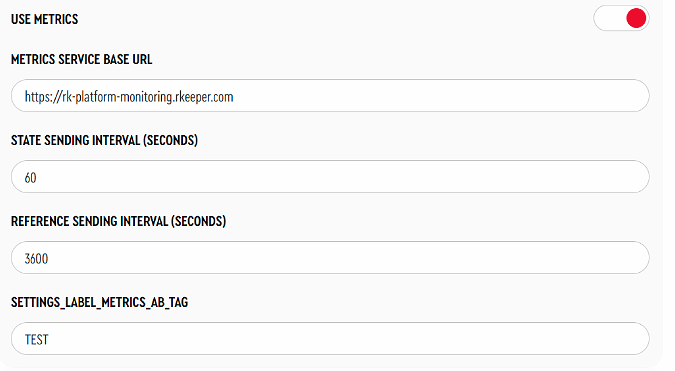
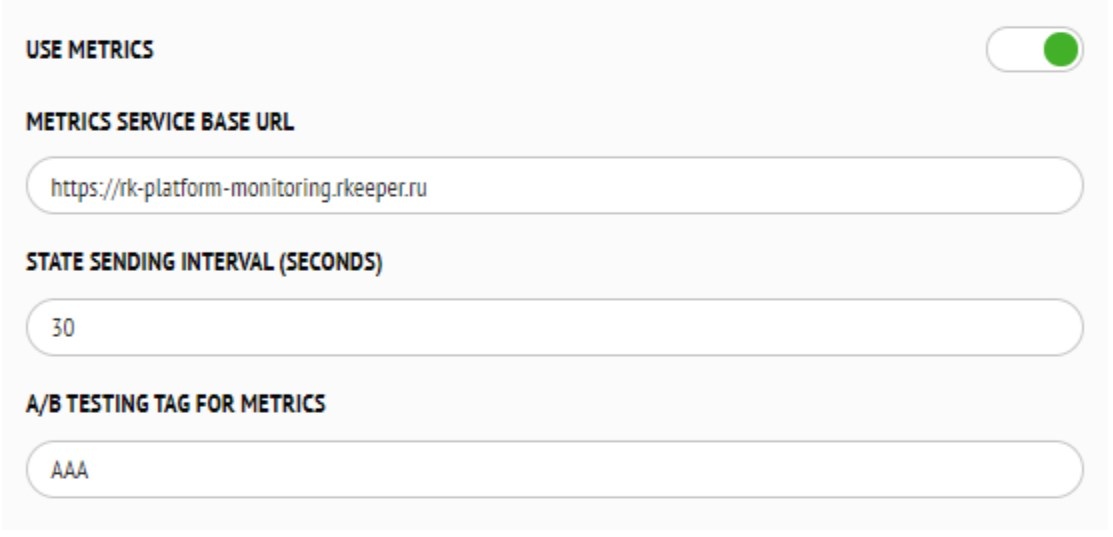
- Enable the parameter Use metrics.
- In the Metrics Service Base URL parameter, specify the address: https://rk-platform-monitoring.rkeeper.com.
- Set the State Sending Interval (seconds) — default is 60 seconds.
- Set the Reference Sending Interval (seconds) — default is 3600 seconds.
- Задайте
Set the
A/B Testing tag for metrics —
используется для дополнительной пометки метрик, значением может быть любая строка, проверки уникальности нет.used for additional labeling of metrics; the value can be any string, and there is no uniqueness check.
To retrieve data from the metrics service, you will need a Token. You can obtain the token by sending a request to the email: yaro@ucsrkeeper.at.
...
- dateFrom and dateTo — the time range for the metrics (from/to).
- cntFrom and cntTo — the message counter range (field cnt).
- total — the number of metrics to return in the response.
- cashNetName — the kiosk name.
- champsID — the kiosk's champsID.
- objectCode — the kiosk object code.
| Code Block | ||
|---|---|---|
| ||
[
     {
        "timestamp": "2025-07-08T14:57:51Z",
        "payload": {
            "typeData": "Time based event",
            "data": {
                "state": "Waiting window",
                "champsID": "234234234234211",
                "kioskName": {
                    "cashGuid": "{1E5C9B01-A065-48B0-882A-DDB46C22BC9C}",
                    "cashNetName": "RK7CASH004"
                },
                "kioskAppVersion": {
                    "back": " v0.0.383.21-rev.7b44ad92-j.42173",
                    "front": "0.0.330.21",
                    "theme": "KFCCee"
                },
                "objectCode": "199990001",
                "tagAB": "AAA"
            },
            "cnt": 21259
        }
    }
] |
- timestamp —дата и время сохранения метрики в сервисе—the date and time the metric was saved on server
payload - typeData —тип метрикиmetric type
payload - data — основная информация по метрике (зависит от типа метрикиmain information about the metric (depends on the type of metric)
payload - cnt —счетчик метрик. Для каждого киоска начинается с 1, увеличивается на 1 по мере отправки метрик с киоска.
...
metric counter. Starts at 1 for each kiosk and increments by 1 as metrics are sent from the kiosk.
Metric types (typeData):
- References — отправляем список активных касс и расписание ресторана, от которого работает киоскwe send a list of active cash registers and the restaurant schedule associated with the kiosk
- Time based event — отправляем название текущего экрана киоска раз в “Интервал отправки состояния (в секундахwe send the name of the current kiosk screen at the “State sending interval (in seconds)”
- Event based event — отправляем информацию по оплате заказа или по отправке заказа для оплаты на кассе.
Общие поля для всех типов метрик:
- — we send information about order payment or about sending the order for payment at the cashier.
Common fields for all metric types:
- champsID —restaurant code in the global KFC system. Any text can be entered here. Uniqueness is not checked
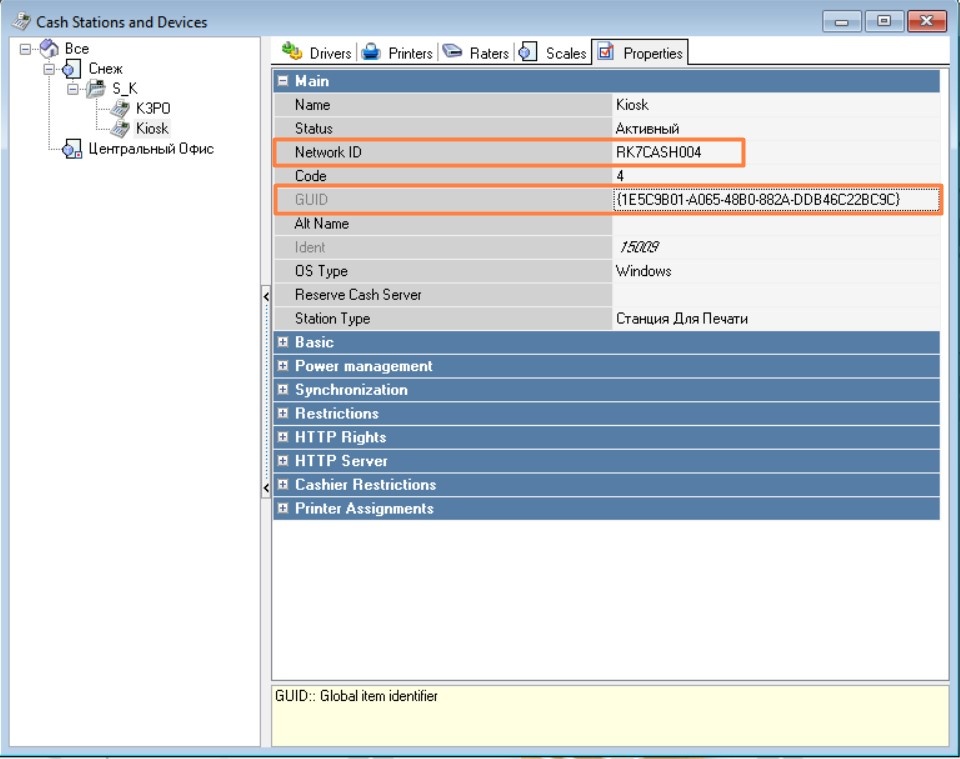
- kioskName - cashGuid — the GUID of the cash register the kiosk is connected to. In the Rkeeper Manager this field is GUID
- kioskName - cashNetName — the network name of the cash register the kiosk is connected to. In the Rkeeper Manager this field is champsID —код ресторана в глобальной системе KFC. Здесь может быть вписано любой текст. Уникальность не проверяется
- kioskName - cashGuid — Guid кассы, от которой работает киоск. В интерфейсе Менеджерской r_k это поле GUID
- kioskName - cashNetName — сетевое имя кассы, от которой работает киоск. В интерфейсе Менеджерской r_k это поле Network ID
kioskAppVersion - back — полная версия бэк части киоска full information about version of kiosk's backend.
Значение поля из примераValue from example: v0.0.383.21-rev.7b44ad92-j.42173:
- v0.0.383.21 — основная информация о версии бэк части киоскаmain information about kiosk's backend part;
- rev.7b44ad92-j.42173 — служебная информацияtechnical information.
- kioskAppVersion - front — версия фронт частиfront part version name
- kioskAppVersion - theme — используемая темаused theme
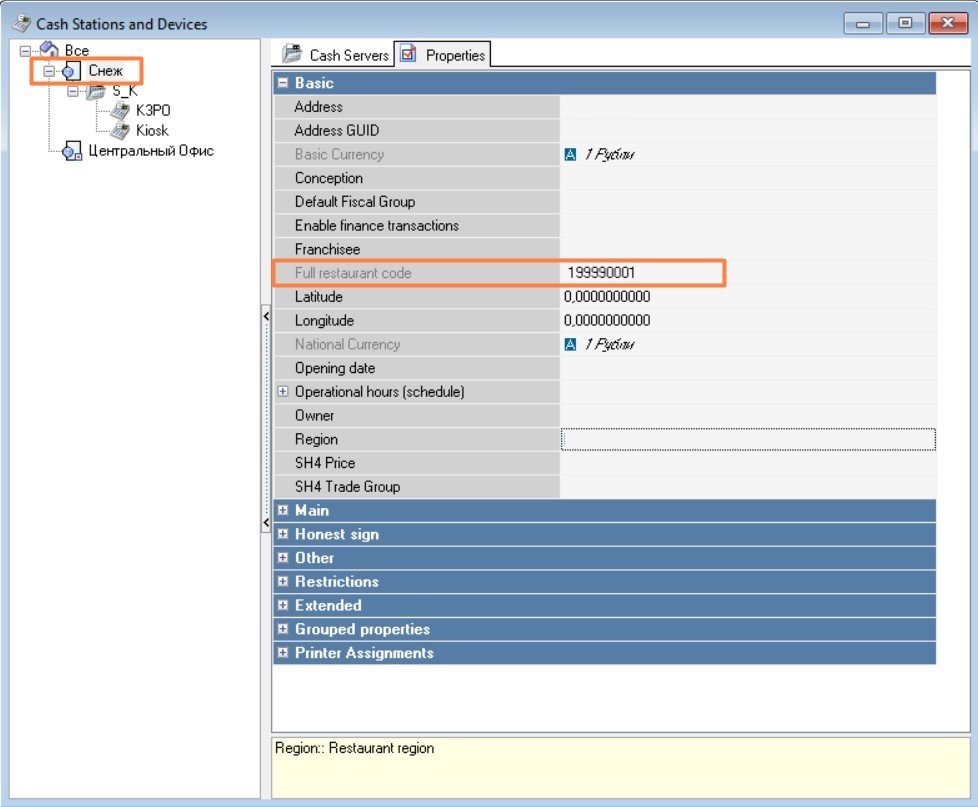
- objectCode — полный код ресторана, от которого работает киоскfull object code, kiosk is connected to
- tagAB - тэг АБ тестирования. Используется для дополнительной пометки метрик. Задается при первичных настройках киоска в параметре A/B Testing tag. Used for additional labeling. Set during the initial kiosk configuration in the parameter A/B Testing tag for metrics. Значением может быть произвольная строка, проверки уникальности нет.
...
- The value can be any string, and uniqueness is not checked.
Fields depending on the metric type (data):
Тип метрики References
Metric type: References
The kiosk sends a list of active cash registers and the restaurant schedule associated with the kioskКиоск отправляет список активных касс и расписание ресторана, от которого работает киоск.
| Code Block | ||
|---|---|---|
| ||
{
        "timestamp": "2025-07-08T07:13:43Z",
        "payload": {
            "typeData": "References",
            "data": {
                "restaurantSchedule": [
                    {
                        "daysOfWeek": "[dwSunday]",
                        "startTime": 36000000,
                        "endTime": 72000000
                    },
                    {
                        "daysOfWeek": "[dwMonday]",
                        "startTime": 36000000,
                        "endTime": 72000000
                    },
                    {
                        "daysOfWeek": "[dwTuesday]",
                        "startTime": 36000000,
                        "endTime": 72000000
                    },
                    {
                        "daysOfWeek": "[dwWednesday]",
                        "startTime": 39600000,
                        "endTime": 75600000
                    },
                    {
                        "daysOfWeek": "[dwThursday]",
                        "startTime": 32400000,
                        "endTime": 54000000
                    },
                    {
                        "daysOfWeek": "[dwFriday]",
                        "startTime": 36000000,
                        "endTime": 72000000
                    },
                    {
                        "daysOfWeek": "[dwSaturday]",
                        "startTime": 60000,
                        "endTime": 86340000
                    }
                ],
                "cashes": [
                    {
                        "cashGuid": "{7F2B98A5-B365-41EB-A5EC-265E52F05AF1}",
                        "cashNetName": "3252_KIOSK_PRN_1"
                    },
                    {
                        "cashGuid": "{4EAF23A6-2623-401B-A705-88644A2D4976}",
                        "cashNetName": "3252_TER1"
                    },
                    {
                        "cashGuid": "{3F6CE085-1048-47BE-844C-9A3C45EE3851}",
                        "cashNetName": "3252_TER2"
                    },
                    {
                        "cashGuid": "{50EA4090-15D0-4E43-B22E-2324C5E8193A}",
                        "cashNetName": "3252_TER3"
                    },
                    {
                        "cashGuid": "{CEB84F65-0A96-48B4-9EA3-B31A25FFC4DD}",
                        "cashNetName": "3252_PRN"
                    },
                    {
                        "cashGuid": "{A0E029D9-D6D3-414E-9B30-19329677F940}",
                        "cashNetName": "3252_KIOSK_PRN_2"
                    },
                    {
                        "cashGuid": "{E089FA8A-8610-473E-B1AB-0ECC624F5A36}",
                        "cashNetName": "CASH_ONE"
                    }
                ],
                "champsID": "234234234234211",
                "kioskName": {
                    "cashGuid": "{A0E029D9-D6D3-414E-9B30-19329677F940}",
                    "cashNetName": "3252_KIOSK_PRN_2"
                },
                "kioskAppVersion": {
                    "back": " v0.0.383.21",
                    "front": "0.0.330.21",
                    "theme": "KFCCee"
                },
                "objectCode": "199990207",
                "tagAB": "AAA"
            },
            "cnt": 20461
        }
    }
|
restaurantSchedule — расписание работы ресторана—restaurant working schedule::
- daysOfWeek — день недели day of the week
- startTime —время начала работы (время в миллисекундах от начала суток start time (time in milliseconds from the beginning of the day (00:00))
- endTime — время завершения работы (время в миллисекундах от начала суток end time (time in milliseconds from the beginning of the day (00:00)).
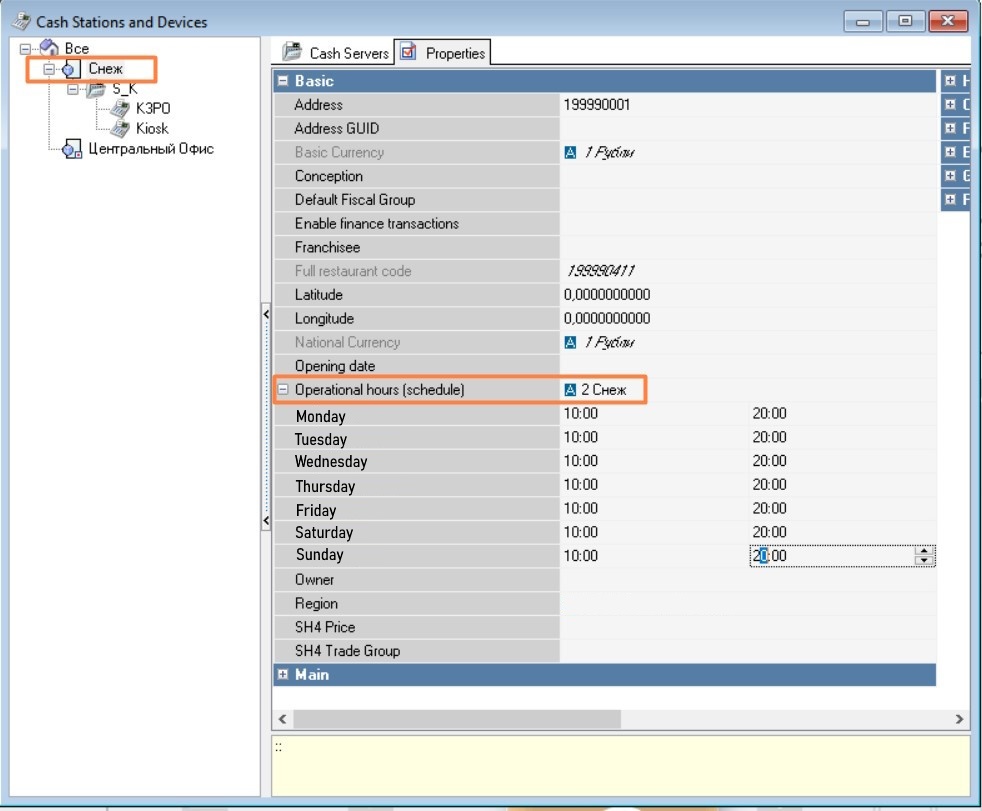
cashes —список активных касс ресторана, от которого работает киоскlist of active cash registers of the restaurant the kiosk is connected to:
- cashGuid —cash register GUID кассы (в интерфейсе менеджерской r_k поле GUID(in the Rkeeper Manager the GUID field);
- cashNetName — сетевое имя кассы (в интерфейсе менеджерской r_k поле Network ID)
Тип метрики Time based event
- network name of the cash register (in the Rkeeper Manager the Network ID field);
- network name of the cash register (in the Rkeeper Manager the Network ID field);
Metric type: Time based event
The kiosk sends the name of the current screen at the “State sending interval (in secondsКиоск отправляет название текущего экрана киоска раз в “Интервал отправки состояния (в секундах)”.
| Code Block | ||
|---|---|---|
| ||
{
	"typeData": "Time based event",
	"data": {
		"state": "Manager functions",
		"champsID": "234234234234211",
		"kioskName": {
			"cashGuid": "{1E5C9B01-A065-48B0-882A-DDB46C22BC9C}",
			"cashNetName": "RK7CASH004"
		},
		"kioskAppVersion": {
			"back": " v0.0.383.21",
			"front": "0.0.330.21",
			"theme": "KFCCee"
		},
		"objectCode": "199990001",
		"tagAB": "AAA"
	},
	"cnt": 20433
}
|
Варианты для поля state (описывает текущий экран на киоскеOptions for the state field (describes the current screen on the kiosk):
- Waiting window — начальный приветственный экран: киоск работает, им не пользуются на момент отправки метрики
- Order — процесс работы с заказом. Начинается со входа в меню пользователем киоска
- Manager functions — персонал выполняет работу в менеджерской киоска
- Locked — киоск заблокирован
- Error — на экране киоска ошибка (например, если при оплате пошло что-то не так). Сообщение выводится, киоск сохраняет работоспособность
- Unknown — другой экран.
Тип метрики Event based event
- initial welcome screen: the kiosk is operational but not in use at the moment the metric is sent
- Order — the order process. Starts when the user enters the menu on the kiosk
- Manager functions — staff is performing tasks in the kiosk’s manager interface
- Locked — the kiosk is locked
- Error — an error is displayed on the kiosk screen (for example, if something goes wrong during payment). The message is shown, but the kiosk remains operational
- Unknown — another screen
Metric type: Event based event
The kiosk sends information about order payment or about sending the order for payment at the cashierКиоск отправляет информацию по оплате заказа или по отправке заказа для оплаты на кассе.
| Code Block | ||
|---|---|---|
| ||
{
	"typeData": "Event based event",
	"data": {
		"orderResult": "successfully",
		"orderGuid": "{DCD36825-1EC0-44FC-8011-F568D18203B8}",
		"error": {
			"code": "0",
			"msg": "unknown"
		},
		"champsID": "234234234234211",
		"kioskName": {
			"cashGuid": "{1E5C9B01-A065-48B0-882A-DDB46C22BC9C}",
			"cashNetName": "RK7CASH004"
		},
		"kioskAppVersion": {
			"back": " v0.0.383.21",
			"front": "0.0.309.21",
			"theme": "KFCMena"
		},
		"objectCode": "199990001",
		"tagAB": "AAA"
	},
	"cnt": 20418
}
|
orderResult — результат работы с заказом.
Возможные варианты заполнения:
- Successfully — заказ успешно оплачен
- Failed — при оплате произошла ошибка
- Error_sending — ошибка при отправке заказа для оплаты на кассе
- Sended — заказ успешно отправлен на кассу для оплаты.
- orderGuid — GUID заказа. Заполнен только если оплата происходит на киоске error —информация по ошибке (при оплате или при отправке заказа для оплаты на кассе):
- code — код ошибки. Если ошибки нет, то значение 0.
- msg — текст ошибки. Если ошибки нет, то значение unknown.
...
— result of an order.
Possible values:
- Successfully — the order was successfully paid
- Failed — an error occurred during payment
- Error_sending — an error occurred while sending the order for payment at the cashier
- Sended — the order was successfully sent to the cashier for payment
- orderGuid — the order GUID. Filled only if the payment is made at the kiosk
error —error information (during payment or sending the order for payment at the cashier):
- code — error code. If there is no error, the value is 0
- msg — error message. If there is no error, the value is unknown.
Erorr examples
| Code Block |
|---|
"error": {
                    "code": "RK7_3813",
                    "msg": "Интерфейс СБП: Ошибка \"Операция отменена\"(18)."
} |
...
| Code Block |
|---|
                "error": {
                    "code": "RK7_3813",
                    "msg": "Интерфейс СБП: Ошибка \"Неверные параметры.\"(18)."
} |
Ошибки на Киоске могут быть как внешними (от Errors on the kiosk can be either external (from r_keeper 7) , так и внутренними.or internal (from kiosk).
Internal erorr codesКоды внутренних ошибок:
| Expand | |||||||
|---|---|---|---|---|---|---|---|
| |||||||
|
Коды внешних ошибок, возвращенных от rk7 (обозначаются с помощью префикса RK7_ и кода самой ошибки) перечислены в статье External error codes returned by rk7 (marked with the RK7_ prefix followed by the specific error code) are listed in the article Коды ошибок.