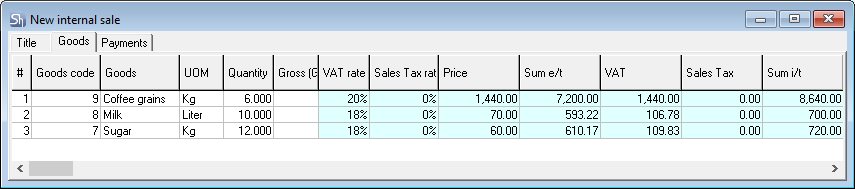
For internal sales, there is no user editing restriction if a price list exists. The internal sale price can be edited without restrictions.
Which of the prices (price w / n or price w / n) is used when creating an outgoing invoice is determined in the menu item "Environment Settings ..." - "Other settings".
You can specify the price for the unit of measure you choose in the Consumable item price field. In this case, after entering the price, the amounts b/n and v/n will be calculated automatically;
You can enter the amount w / n (without taxes) or w / n (including taxes), then the price and the second amount will be calculated automatically;
By default, when adding a product to the invoice, the selling price is substituted from the product card;
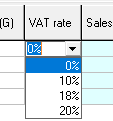
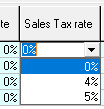
The values in the VAT and EPT fields are calculated automatically depending on the selected rates in the corresponding fields;
When calculating the amount including tax, the amount of VAT is added to the amount without tax, then the amount of VAT is calculated from the amount received, and added to the value obtained by adding the amount without tax and the amount of VAT.
Price of the last expense - the last internal sale is selected from all internal sales documents of the selected product for the division indicated on the invoice header OR for all divisions of the enterprise, which is determined relative to the specified supplier division in the current internal sale. Which of the "last invoice" selection methods is used is determined in the SDBMan.exe settings.
You can also set the selling price using the "Set amounts ..." functionality;
"Write off at cost" is not available for "Domestic sale" because movement between divisions at cost price is made out through the invoice "Internal movement".
The fields of the Cost price part (Price, Amount w/n, VAT, VAT, Amount w/n) will be automatically filled in after the document is saved active;
If the lines with the amounts in the Internal Sale are highlighted in red, then the Selling Price is less than the Purchase Price, i.e. as a result of the write-off, a negative margin is formed.
In the Compensated quantity and amounts fields, after saving the sales document, the quantity of the missing item and its price are displayed on a red background in the case when the quantity of the item on the invoice exceeds its availability in the department from which the write-off occurs. Otherwise, the fields will remain empty;
Repeat the above steps for each consumable item;
Save the document (the main menu item "Document" - "Save document" or the button on the toolbar).