ABC Analysis by Products
Product ABC Analysis allows you to understand which ingredients are best to stock up on in advance, and which should be purchased as needed. In this analysis, goods are divided into three groups (A, B, C) for each characteristic – in how many menu items (dishes) they are used as an ingredient, at what cost they are purchased, and the quantity used during the period.
Within a group, menu items (dishes) are distributed by numbers depending on demand. The maximum number in the group is indicated after a slash.
The user independently defines the percentage boundaries for splitting groups on the ABC scale.
It is recommended to generate this report separately by departments, that is, separately for bar products and for kitchen products for objective analysis.
Let's consider an example: the product "whiskey" in such analysis often falls into group "A" by cost and by turnover, while by inclusion in dishes (menu items) for such an item it will be "C" (a draught item). This means that for this item it is necessary to look for profitable suppliers not only in terms of the cost of purchasing the goods, constant availability of this item in supplier warehouses, but also in terms of payment deferral conditions, since such an item with a fairly high price is purchased by the restaurant quite often.
Consider another example: the product "chicken fillet" by turnover and by inclusion in dishes in analysis often falls into group "A", and by cost into "B". Since this product is included in a large number of dishes and is not extremely expensive, it is necessary and possible (as it will not lead to a large freezing of funds) to keep it in stock. Also, for such goods, it is necessary to have 2-3 backup suppliers, as the absence of this product in the enterprise will lead to a large stop-list.
To build the "Product ABC Analysis" report, it is necessary to assign attributes to the items of the goods directory:
"Product" is assigned to goods sold through the r_keeper cash register system and which are not unit goods; the goods themselves are not displayed in the report. But! They participate in the formation of the report. If these items are linked to sets, the system will break down the consumption to the ingredients according to these sets and display the ingredients with the "Raw Material" type in the report to obtain data in the report.
"Raw Material" is assigned to goods that are ingredients and/or goods that are sold as unit goods; this type is displayed in the report.
"Undefined" is assigned to auxiliary goods that are semi-finished products. This type of goods does not participate in the formation of data in the report. This type must be assigned to semi-finished products so that when receiving the report, the system does not break down the consumption for these items to ingredients. Otherwise, duplication of consumption will occur in the report (by Products + by Semi-Finished Products).
ABC Analysis by Products - Filter
The filter for the ABC Analysis by Products report: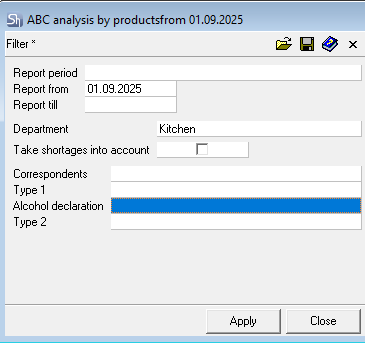
The filter parameters "Report from ... to...", "Correspondents", "Report Currency" are filled in using standard methods.
Additional filter fields:
Department – the report is generated for a specific department, which must be specified in the filter. The report is generated for only one department.

Take Shortages into account – this flag regulates the accounting of information on goods shortages in the report. When the flag is set, goods shortages from reconciliation reports will be used when generating the report.
After filling out the filter, to generate the ABC analysis by Products, click the [Apply] button.
ABC analysis by Products - Content
The table of the ABC analysis by Products report:
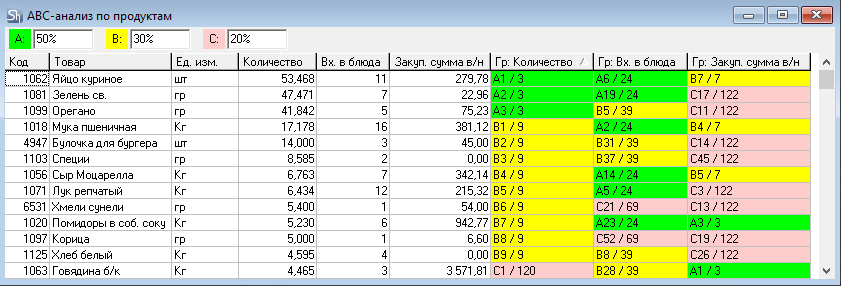
In the upper part of the window, the percentage boundaries for splitting groups on the ABC scale are indicated. They can be entered using the keyboard or selected from two standard options by calling the context menu from the gray field at the top of the window. 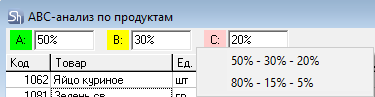
Quantity – the quantity of the product consumed during the report period. Expenditure delivery notes for correspondents specified in the filter, expense parts of all assembly sets ("complectations"), processing notes, internal transfers, disassembly acts ("decomplectations"), and shortages from reconciliation reports are taken into account, if the filter is set.
Inc. in dishes – all set assemblies linked to goods with the ABC analysis type "Product" are "exploded" down to ingredients (including semi-finished products) and the number of sets (dishes) across the entire r_k StoreHouse Pro database that include a specific ingredient is calculated.
Purchase sum i/t – the total cost including taxes of the consumed quantity of goods based on expenses from the department in the filter.
Report fields:
Code – this field displays the goods code.
Goods – this field displays the name of the goods item with the type "Raw Material" specified in the product properties.
UOM – base unit of measurement for the product.
Quantity – this field displays the quantity of the goods item from the expense parts of r_k StoreHouse Pro documents according to the values selected in the filter.
Inc. in dishes – the number of dishes (goods linked to sets) that include this product across the entire r_k StoreHouse Pro database.
Purchase sum i/t – the sum of the cost including taxes of the written-off quantity of the product.
In the columns Group: Quantity, Group: Inc. in dishes, Group: Purchase sum i/t, it is indicated to which group the product belongs based on the specified characteristics according to the indicated percentage boundaries for splitting groups on the ABC scale.
For the correct formation of the report, attention should be paid to the base units of measurement of the goods displayed in the report. Because the report can be distorted due to the use of different dimensions.
For example, the goods item "Chicken Egg" fell into scale "A" for two out of three indicators, because the unit of measurement "piece" is used, and the inclusion of this item is analyzed on par with the use of more significant units of measurement such as "liter" and "kilogram". For the correct formation of the report, either the base unit of measurement for this product needs to be changed to "kg" (which is not always convenient), or this item should be excluded from the report (change the value on the product card "For ABC Analysis").
Second example – Spices (see "Oregano"). They standardly have the base unit of measurement "grams", as they are used in small quantities. Besides, spices always have a high cost. Here it is also necessary to decide on the need for these items to participate in the report. And if they must participate in the report, use "kilogram" as the base unit of measurement for these goods.