In the "User Properties" on the StoreHouse tab, the user's permissions for department groups and documents they can work with are defined.
For more flexible regulation of user access to creating documents and viewing reports by correspondents and goods groups, additional grouping of correspondents and goods groups into filter groups has been added. Configuring access to these groups helps regulate user work with correspondents and goods groups.
Filter groups are created in the StoreHouse menu item in the Sdbman application (see details in the r_k StoreHouse Pro User Guide).
To restrict a user's access to the correspondents and goods directories, check the boxes next to the necessary filter groups.
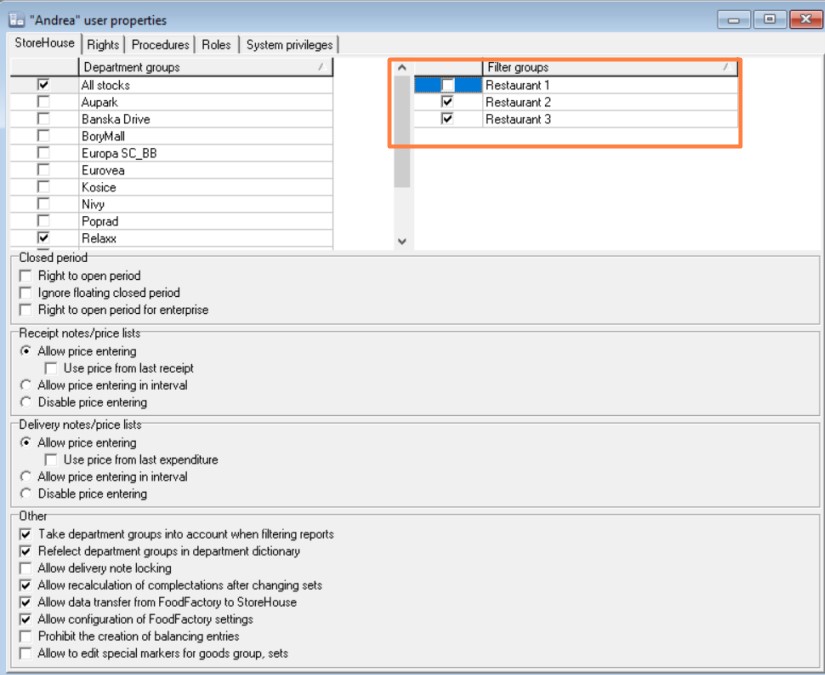
If a specific filter group is assigned to a user, when working with documents and reports, only correspondents and goods from the filter groups defined for the user in the "Filter Groups" area will be available.
If no filter group is selected, all correspondents and goods will be available to the user when working with documents and reports.