Account Balance
The report displays information on the balance and turnover of funds for each account.
Account Balance - Filter
The filter for the Account Balance: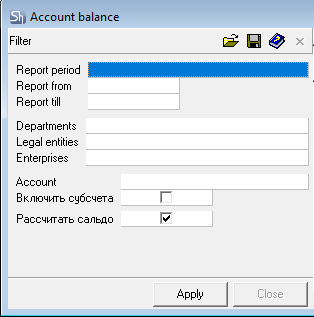
The filter parameters "Report from ... to...", "Departments", "Legal Entities", "Enterprises", "Report Currency" are filled in using standard methods.

If the report includes payment documents not linked to delivery notes (for determining departments for filtering), the visibility of payments in the report is determined by the legal entities available to the user. Determination of availability occurs relative to the departments permitted to the user via department groups.
Additional filter fields:
Account – when this field is filled, the balance will be generated for a specific account. If the field is left blank, the account balance will be generated for all accounts.
Include Sub-accounts ("Включить субсчета") – when this flag is set, the report displays the balance for the account and its sub-accounts.
Calculate Balance ("Рассчитать сальдо") – when this flag is set, the system will calculate the balance for each account at the beginning and end of the selected period from the filter. Without the flag, the balance calculation will not be performed.
After filling out the filter, to generate the report, click the [Apply] button.
Account Balance - Content
The table of the Account Balance report: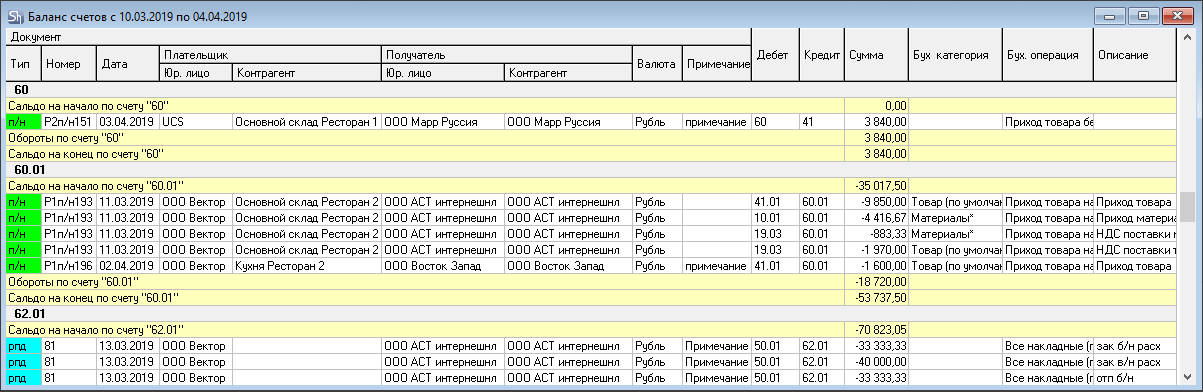
The report is automatically grouped by account. An account in an entry can participate as a source (credit – amount with a negative value) or as a recipient (debit – amount with a positive value).
For each account, the following is displayed:
Opening Balance – the balance of funds at the beginning of the period specified in the report filter.
Account Turnover – the turnover of funds (the sum of all documents) for the account during the period specified in the report filter.
Closing Balance – the balance of funds in the account at the end of the period specified in the filter.
The account turnover is made up of the amounts of all documents in whose entries the account participates. The table contains all documents for the report generation period.
Type – field for the document type for which the entry was generated;
Number – field for the document number;
Date – field for the document date;
Payer ("Плательщик") (Legal Entity/Counterparty) – the field displays information depending on the document type:
For receipt delivery notes – Own Legal Entity + Department
For expense delivery notes – Correspondent-Recipient
For receipt payment documents – Correspondent-Payer
For expense payment documents – Own Legal Entity + Department
Payee ("Получатель") (Legal Entity/Correspondent) – the field displays information depending on the document type:
For receipt delivery notes – Correspondent-Recipient
For expense delivery notes – Own Legal Entity + Department
For receipt payment documents – Own Legal Entity + Department
For expense payment documents – Correspondent-Payer
Currency – the field indicates the document currency;
Note – note from the document header attributes;
Debit – the field shows the debit account of the entry;
Credit – the field indicates the credit account of the entry;
Sum total – the posted amount;
Acct. Operation – the name of the accounting operation used on the document.
Acct. Category – the accounting category of the goods for the posted amount;
Description – if a description is defined for the operation in the dictionary, it will be displayed in this field.