The report presents data on the balance at the beginning and end of the period, as well as turnovers (receipt and expense amounts by documents) for the selected correspondent or group of correspondents.
Delivery notes and payment documents issued for correspondents from the filter are analyzed as documents.
Balance by Correspondents - Filter
The filter for the Balance by Correspondents report:
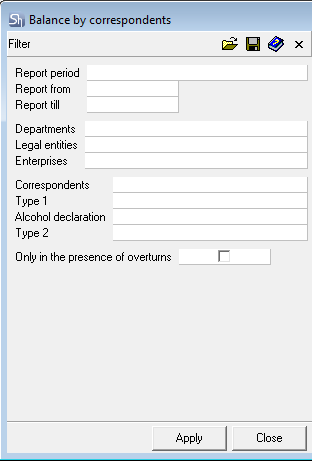
The filter parameters "Report from ... to...", "Departments", "Legal Entities", "Enterprises", "Correspondents", "Report Currency" are filled in using standard methods.
If the report includes payment documents not linked to delivery notes (for determining departments for filtering), the visibility of payments in the report is determined by the legal entities available to the user. Determination of availability occurs relative to the departments permitted to the user via department groups.
Additional filter fields:
Only in the presence of overturns (Only with Turnover) – this flag regulates the display of correspondents without documents in the specified report period. When the flag is set, the report will only include information for correspondents with turnover in the given period.
After filling out the filter, to generate the report, click the [Apply] button.
Balance by Correspondents - Content
The table of the Balance by Correspondents report:
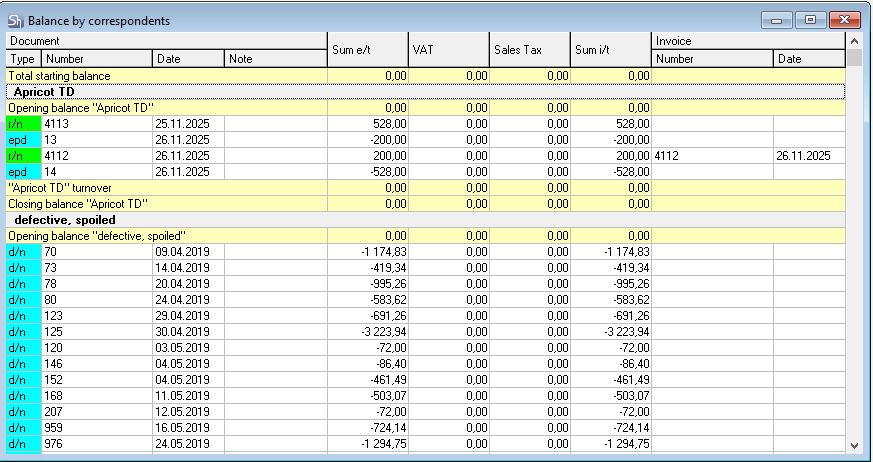
Total Opening Balance, Total Turnover, Total Closing Balance – general information in monetary terms for the correspondents from the filter at the beginning of the reporting period is displayed in the report table, total turnover for all correspondents and the total balance at the end of the period are calculated.
Information for each correspondent is displayed separately with its opening balance, turnover, and closing balance.
Whether to display correspondents without turnover during the reporting period (see "Cash") in the report or not must be specified in the filter.
The report is grouped by correspondents by default.
Document (Type, Number, Date) – parameters of the document generating the turnover for the correspondent.
Sum e/t, VAT, Sales Tax, Sum i/t – amounts from documents creating turnover for the correspondent. Amounts with a positive sign are generated by receipt delivery notes, returns from customers, and receipt payment documents. Amounts with a negative sign are generated by expense delivery notes, returns to suppliers, and expense payment documents.
Invoice (Number, Date) – if an invoice is linked to the delivery notes, then information about the invoice will be displayed in these fields.
