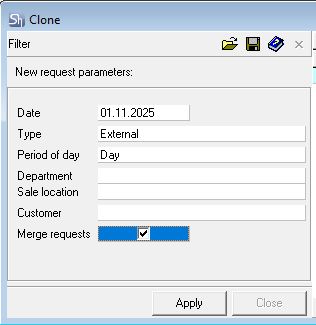
When working with requests, it is sometimes necessary to create copies of a group of requests or make a consolidated request from the selected ones. The"Clone Selected Requests"function allows you to:
Combine the selected group of requests into one request.
Copy the selected group of requests with the ability to change parameters of the created requests.
Change the request type, date, counterparty.
Select a request/group of requests in the list and use the "Clone Selected Requests" item in the context menu.
This function can also be used for a single request.
A filter for creating new requests will open.
Date– specify the date for which the new requests will be created. If the date is not specified, copies will be created with the dates of the selected requests. Type– define the type of requests to be created (internal or external). Requests can only be created of one type. This field is mandatory. Day Period– set the day period with which the new requests will be created. If the field is not filled, the value will be taken from the source requests. Department– if a specific department needs to be specified for the created request copies, fill in this field. If the field is not filled, the department will be taken from the source requests. Sale Location– if a specific sale location needs to be specified for the created request copies, fill in this field. If the field is not filled, the sale location will be taken from the source requests. Customer– if a specific customer needs to be specified for the created request copies, fill in this field. If the field is not filled, the customer will be taken from the source requests. Merge Requests– check this flag if you need to create one common request from the group of selected requests.
When creating a merged request, all filter fields must be filled in.
The merged request is created as"Active".
Click [Apply] to create copies of the selected requests or to create a merged request. The copying result will be displayed in a separate window.