Cocktail Sales — the report provides information on the results of processing sold goods. The report includes sold goods and their ingredients. The report is generated based on External Requests.
To generate this report, the following settings must be made:
On the product card of the goods participating in the requests, on the "Add. Parameters" tab in the "For External Systems" section, you need to specify the "EGAIS" ("USAIS") property. Assignment is available through group operations.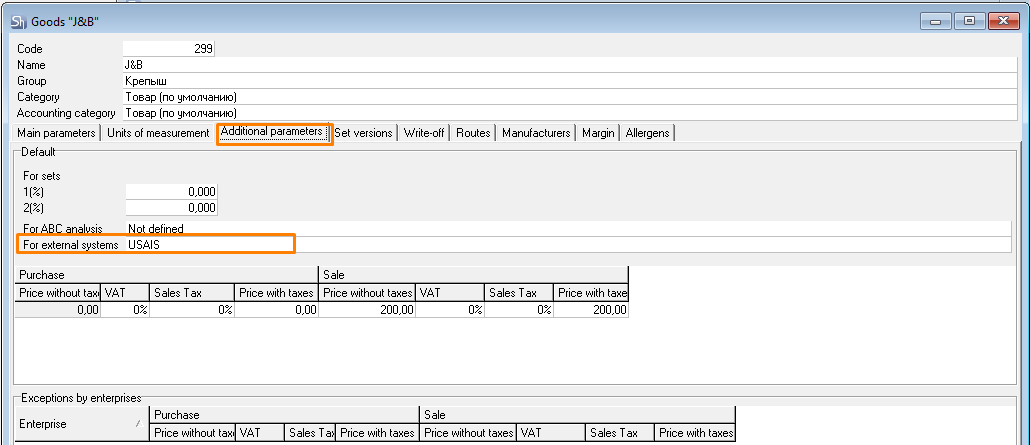
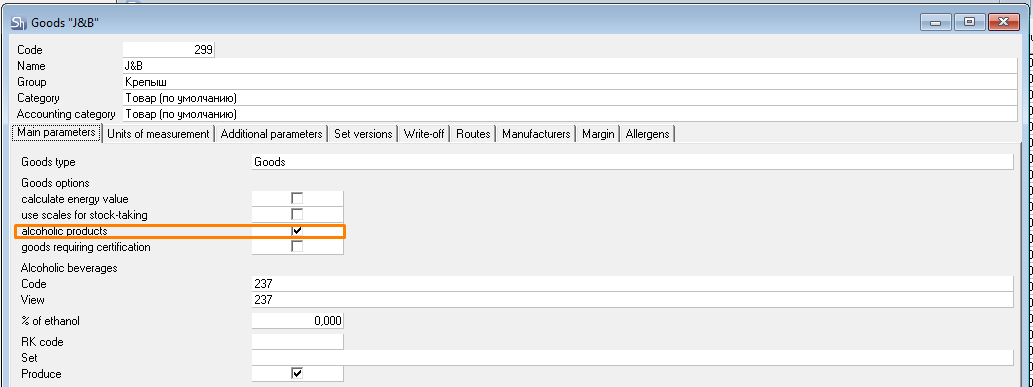
Goods with the "Alcoholic Products" flag are displayed as ingredients in the report.
Cocktail Sales - Filter
The filter for the Cocktail Sales report is shown in the figure.
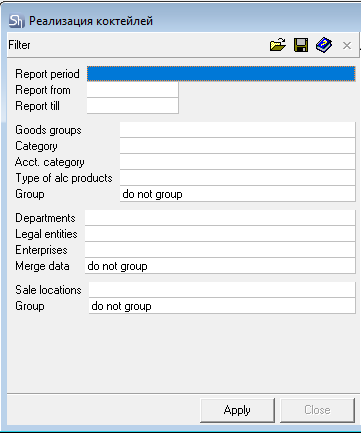
The filter parameters "Report from ... to...", "Goods Groups", "Category", "Acct. Category", "Type of Alcoholic Products", "Departments", "Legal Entities", "Enterprises" are filled in using standard methods.
The filter by "Type of Alcoholic Products" is not used in the report filtering, because the "Alcoholic Product" flag is rarely used on the product cards of goods participating in requests.
Additional filter fields:
Sale locations – in this field, you can select the sale locations whose requests will be used to generate the report.
Group By – if necessary, select the method for grouping the report data output in this field: Do Not Group or By Sale locations.
After filling out the filter, to generate the Cocktail Sales report, click the [Apply] button.
Cocktail Sales - Content
The table of the Cocktail Sales report with all groupings is shown in the figure.
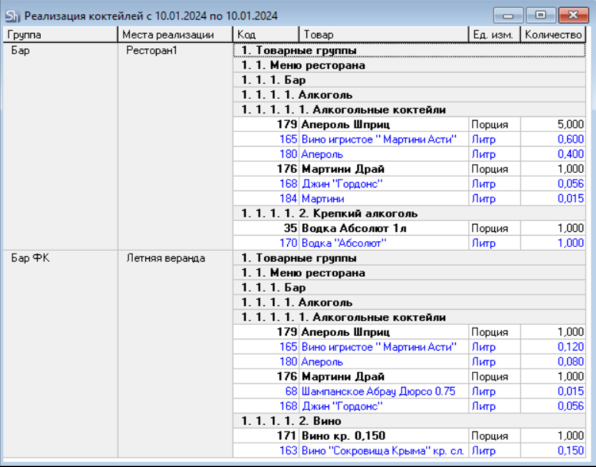
The report contains information on the quantity "in liters" of alcoholic products sold (the "alcoholic product" flag is set in the ingredient product) through menu items (dishes) (the "produce" flag is set in the dish product) from the External Request document.
The report uses both written-off (have related delivery notes) and non-written-off (no delivery notes) external requests.
Groupings on the left:
Group – the selected grouping method in the filter based on your organization's details (Departments or Enterprises, or Legal Entity).
Sale locations – if the "by sale locations" grouping is set in the filter.
Table fields:
Code, Goods – this field displays the code and name of the goods/service.
UOM – contains the name of the goods item's unit of measurement for which the Report flag was set in the product card on the Units of Measurement tab.
Quantity – this field displays the quantity of the sold goods/service.
Ingredients are displayed in the report in blue under the menu item (dish) they are associated with.
UOM of Ingredients – always Liter.
Quantity – the total volume of the ingredient in liters, calculated based on the set of the sold dish (menu item).
