Based on the generated report, you can create delivery notes for the receipt of goods (transfer, production, supply) to the recipient departments.
To generate delivery notes, the report filter must have:
only one delivery note type specified
the value by departments set in the Merge Data line
the flag set in the Group by Suppliers line.
To create delivery notes, use the context menu item "Create Delivery Notes". In the opened window, fill out the filter for the delivery notes to be created.
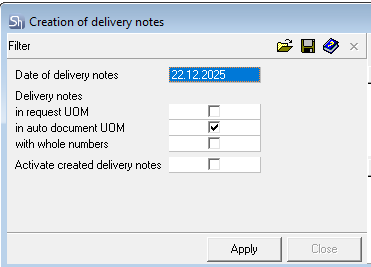
Delivery Note Date — define the date for which the delivery notes will be created. The "Date From" from the report filter is inserted by default. All delivery notes are created with one date, regardless of the dates of the requests on which the report is based. Since the generated delivery notes organize receipt into warehouses, the delivery notes must be created earlier than the requests.
Delivery Notes in Request UOM / in Auto-document UOM — define in which units of measurement the delivery notes will be created.
With Whole Quantities — When this flag is set, goods in quantities rounded to whole values will be added to the delivery notes.
Activate created delivery notes — set this flag if the delivery notes need to be created in an active state.
Click [Apply] to create the delivery notes.
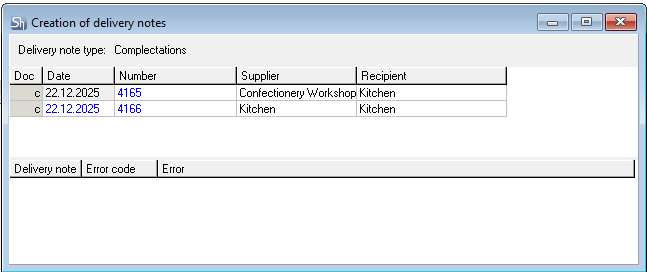
A log of delivery note creation will open.
The upper part displays the list of created delivery notes.
The lower part displays the "Error Log", if an operation could not be performed during document creation.
You can then process the main requests without processing the child requests.