Delivery Note Payment Dates
The report allows you to view data on the amount of overdue payments. The date of payment documents, after which payments are considered overdue, is specified in the Payment Due Date field on the Title page of the delivery note.
The Overdue Debt as of Date set in the report filter (the report filter date) is compared with the delivery note dates specified in the Payment Due Date field of the delivery note title.
If the date in the report filter is earlier than the delivery note payment due date, then regardless of the delivery note payments, the overdue debt is considered equal to 0.
If the report filter date is greater than or equal to the delivery note payment due date, then payments (listed on the Payments page of the delivery note) with a date less than or equal to the report filter date are considered not overdue. The overdue debt for the delivery note is calculated as the delivery note amount minus the amount of all non-overdue payments.
Delivery Note Payment Dates - Filter
The report filter:
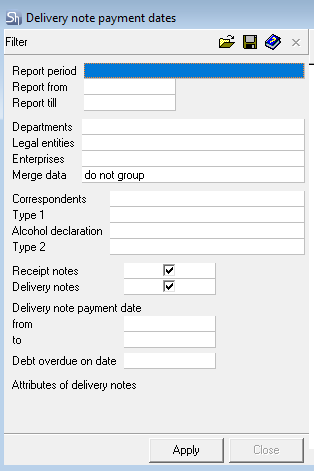
The filter parameters "Report from ... to...", "Departments", "Legal Entities", "Enterprises", "Correspondents", "Report Currency" are filled in using standard methods.
Additional filter fields:
Receipt delivery notes – check this flag if the report should be built only for receipt delivery notes;
Expenditure delivery notes – check this flag if the report should be built only for expenditure delivery notes;
Delivery note Payment Due Dates from/to – in these fields, enter the period for which delivery note payment due dates will be taken into account in the report;
Overdue Debt as of Date – the date from which the delivery note payment is considered overdue.
Delivery note Attributes – additional filters for delivery note title attributes can be added to the filter.
After filling out the filter, to generate the report, click the [Apply] button.
Delivery Note Payment Dates - Content
The Delivery Note Payment Dates report with data merged By Departments: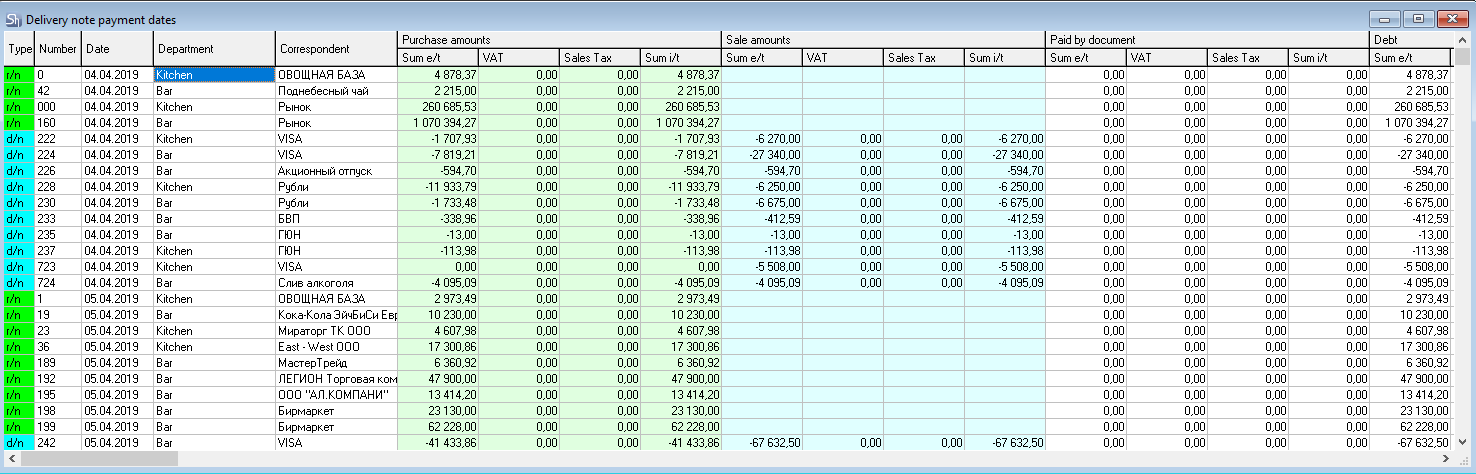
Type – document type;
Number – document number;
Date – document date;
Payment Due Date – the control payment date from the invoice for determining debt;
Supplier – the correspondent who is the supplier for the document;
Recipient – the department that is the recipient for the document;
The Purchase Amounts area contains columns:
Sum e/t – purchase amount excluding taxes;
VAT – value-added tax amount;
Sales Tax – sales tax amount;
Sum i/t – purchase amount including taxes;
The Sales Amounts area contains columns:
Sum e/t – sales amount excluding taxes;
VAT – value-added tax amount;
Sales Tax – sales tax amount;
Sum i/t – purchase amount including tax costs;
The Paid against Document area:
Sum e/t – paid amount for the document excluding taxes;
VAT – value-added tax amount;
Sales Tax – sales tax amount;
Sum i/t – paid amount including taxes;
Debt area:
Sum e/t – debt amount for the document excluding taxes;
VAT – value-added tax amount of the debt;
Sales Tax – sales tax amount of the debt;
Sum i/t – debt amount including taxes;
Overdue Debt area:
Sum e/t – overdue debt amount for the document excluding taxes;
VAT – value-added tax amount of the overdue debt;
Sales Tax – sales tax amount of the overdue debt;
Sum i/t – overdue debt amount including taxes.