Estimated Consumption
Estimated Consumption — is a report that displays the entire list of goods required to process a request. This report also provides information about errors that will prevent the request from being processed in full. From this report, you can generate delivery notes or call up dictionaries to correct errors.
The "Estimated Consumption" operation allows you to:
See possible errors made in creating sets that will prevent the request from being processed in full;
Assess the "correctness" of sets;
Prevent the appearance of compensated entries.
It is recommended to perform a preliminary consumption calculation before executing the "Create Delivery Notes for the Request" operation.
To perform a preliminary consumption calculation, select the required requests — you can select one request or several, call the context menu, select the Estimated Consumption item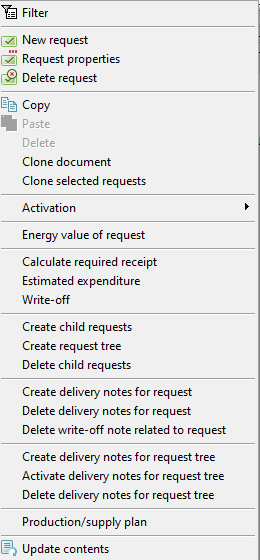
and fill in the opened filter.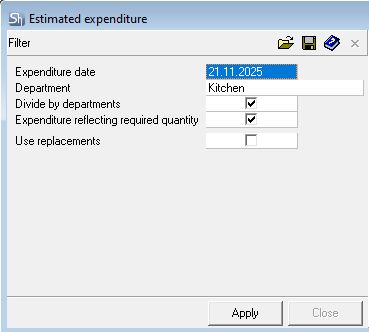
Consumption Date — enter the date for which the consumption needs to be calculated in this field.
The set versions, relative to which the "Estimated Consumption" will be formed, will be determined by this date. The stock levels as of the date specified in the filter will be displayed for the obtained list of ingredients, by the departments from the requests.
Department — if you specify a department in this field, only those goods from the selected requests that have the department selected in the filter specified in their header will be presented in the "Estimated Consumption".
If you do not specify a department in this field, goods from all departments will be presented.
If "Estimated Consumption" is selected for only one request, then the department is already the only one for the "Estimated Consumption".

Filling this field in the filter only makes sense when calling the "Estimated Consumption" function for several selected requests, to avoid filtering the required requests at the request list selection level.
Flag Split by Departments (available when the aforementioned Department field is not specified) — this flag is set by default when calling "Estimated Consumption". If "Estimated Consumption" was called for several requests issued for different departments, this flag outputs the list of goods to be written off, split by departments.
Result of applying the filter with the flag set: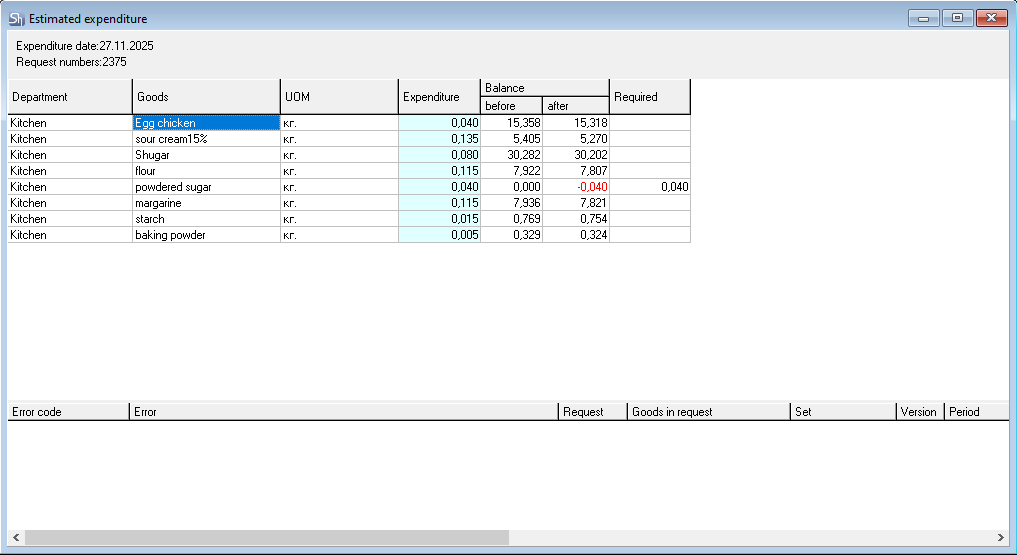
If the Split by Departments flag is not set, then a general list of goods required to fulfill the selected requests will be displayed in the report. The report will also not contain data on goods stock.
Result of applying the filter without the flag: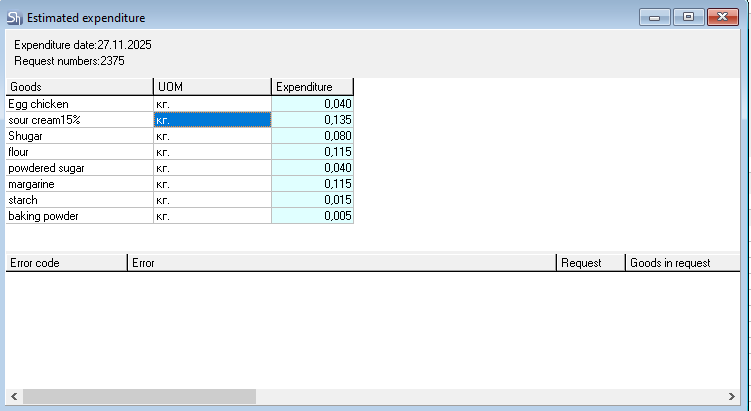
Flag Consumption Considering Required Quantity — this flag determines for which quantity of dishes in the request to form the "estimated consumption": based on the consumption quantity or based on the "required receipt" quantity.
Flag Use Interchanges — this flag determines whether to apply or not the interchange groups assigned to sets in case of a shortage of the main set ingredient during the estimated consumption calculation.
The figure shows the "Estimated Consumption" for the dish "Cappuccino" without applying the interchange group: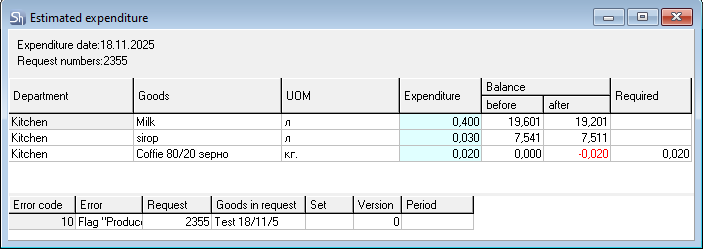
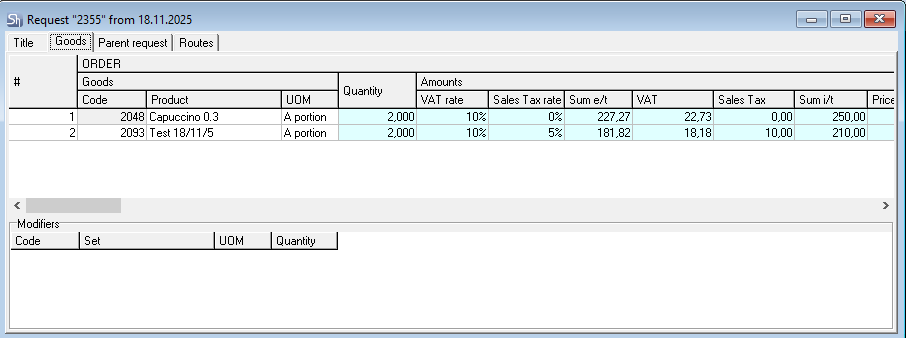

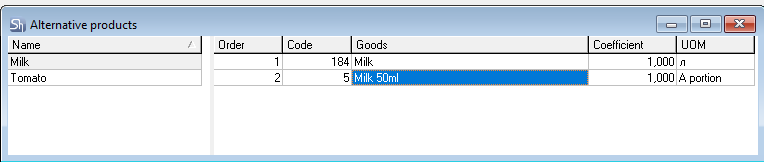
The order of item interchange is determined in the interchange group, as well as the interchange coefficient.
The list of performed interchanges can be viewed in the lower right part of the "Estimated Consumption" window.
Consumed Item — the item from the request, for whose set ingredients interchanges have been applied in the estimated consumption.
Substituted Item (Name, UOM, Quantity) — the set ingredient and its quantity, which is insufficient in the department's stock for write-off, and which will be replaced according to the rules of substitutable items.
Substituting Item (Name, UOM, Quantity) — the item and its quantity that has been substituted according to the rules of substitutable items.
When writing off ingredients from a modifier set, substitutable goods ARE NOT USED.
After filling out the filter, click the [Apply] button to generate the "Estimated Consumption" report.
The report header displays:
Consumption Date — the date for which the estimated consumption is calculated.
Request Numbers — the list of request numbers for which the "Estimated Consumption" operation was called.
The report is divided into two parts:
Upper Part — contains the list of items that will participate in the write-off when the request is processed.
Lower Part — contains errors, without correcting which the write-off will occur incorrectly, i.e., not all items that need to be written off will be accounted for. This, in turn, will lead to incorrect formation of calculated stock balances in the program.
If the protocol contains the error "The 'Produce' flag is set, but the set is not defined", then this item will not be added to the "Assembly" ("Complectation") document; only a "Delivery Note" will be generated for it.
Before processing requests, we recommend correcting all errors from the lower part of the "Estimated Consumption" report.
The lower part of the report — errors
Error Code — internal error number in r_keeper StoreHouse Pro.
Error — error text.
Request — the number of the request where the error occurred.
Request Item — the name of the item from the request for which the error occurred.
Set, Version, and Date — this field is filled if the error is related to the set of the item from the request. The name, version, and date of the set that needs to be modified are displayed.
Possible errors during the operation "Estimated consumption":
Reason | What to do? |
Error: The 'Produce' flag is set, but the set is not defined | |
The “Produce” flag is put on the product card, but the set itself is not indicated. |
If you do not fix the error, then this product will not be added to the “Assembly” document, only “Delivery note” will be formed for it. |
Error: an empty set on a given date. | |
There are no ingredients in the package of the set on the tab. | |
Error: The request department is not defined. | |
The request does not define a department for writing-off. |
|
Error: the counterparty is not determined in the route. | |
In the request for the goods, the supplier for the route is not defined. | |
To correct an error related to a set, call "Set Properties" from the "Period" field; this will open the set card of the required version and period for correction.
The upper part of the report
Department — the name of the department from which the goods will be written off.
Item — the names of the items that will be written off as a result of processing the requests.
UOM — the name of the units of measurement for the items in which delivery notes will be created as a result of processing the requests.
Consumption — the quantity of the item that will be written off as a result of processing the requests.
Stock Before — the stock of the item in the department before processing the requests.
Stock After — the calculated stock of the item in the department after processing the requests. "Stock Before" minus "Consumption".
Required — if the "consumption" quantity is greater than the "stock before" quantity, this field displays information about the insufficient quantity of the item for correct write-off.
The value in the "Stock After" field is highlighted in red if the calculation result is negative (the after column). For such an item, the rightmost column Required displays the quantity of this item needed to cover the negative stock.
- The system will allow processing requests with negative values in the "Stock After" fields. In this case, compensated entries will be created, bringing the stock balances of these items to zero. When backdating receipt notes, compensated entries are automatically deleted.
- We recommend analyzing the reasons for negative values, eliminating them, and then performing the "Create Delivery Notes for the Request" operation for the selected requests.
Item Inclusion in Sets from the "Estimated Consumption"
The "Estimated Consumption" report generates a list of items based on the request items needed to process the selected requests.
If you need to analyze the value in the "consumption" field for an item, use the "Item Inclusion in Sets" item in the context menu.
"Item Inclusion in Sets" allows you to see the list of request items and the sets associated with them, in which the item from the "Estimated Consumption" participates.
The report displays both the request items themselves and modifiers.
The "Item Inclusion in Sets" report window:
You can open a set from the report and make changes. After modifying the set, use the "Refresh Content" item in the context menu to update the information in the report.
Report fields:
Department — the name of the department from which the ingredient item will be written off.
Ingredient — a group of fields for the ingredient item on which the "Item Inclusion in Sets" report was called from the "Estimated Consumption".
Code, Name, Unit of Measurement — data of the ingredient item.
Consumption — the quantity of the ingredient item that will be consumed for each line of the report.
Consumed Item — a group of fields for the item from the request for which the write-off will occur.
Code, Name, Unit of Measurement — data for the item from the request.
Qty — the quantity of the item from the request that needs to be processed (written off/produced).
Set — a group of fields for the set that includes the ingredient item from the estimated consumption.
This area will contain the sets of the request item and the modifier set, if modifiers were used for the request item.
If an ingredient item is part of both the request item's set and a modifier, the request item will be displayed in two lines, and the set will display the name of the set for the item the name of the modifier set in the second line ("Double Espresso" as an example).
If a modifier has a negative value, then the modifier line will be added to the "Item Inclusion in Sets" report with a negative value in the "Consumption" field.
If substitutable items were used in the estimated consumption, then when calling "Item Inclusion in Sets", the substituting item will have a link to the dish and set of the substituted item.
Copy "Estimated Consumption" to Delivery Note
The "Estimated Consumption" report generates a list of items based on the request items needed to process the selected requests. From this report, you can copy the list of items into any delivery notes in r_keeper StoreHouse Pro.
"Estimated Consumption" is a reverse calculation of items based on sets, taking into account their quantities.
To copy the list of items to delivery notes:
Select requests in the list;
Generate "Estimated Consumption";
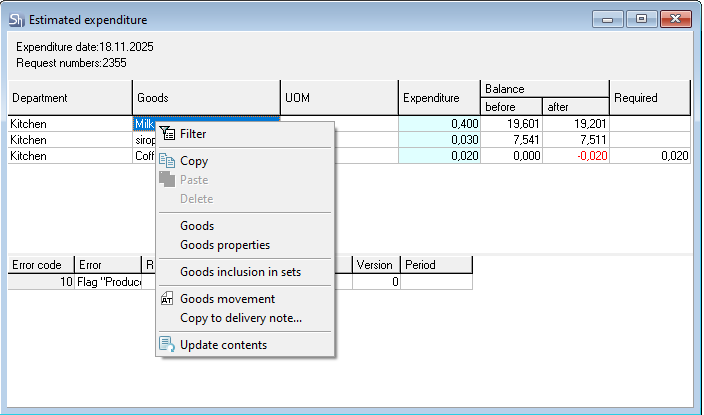
Use the "Copy to Delivery Note" item in the context menu;
In the opened window, select the copying parameters;
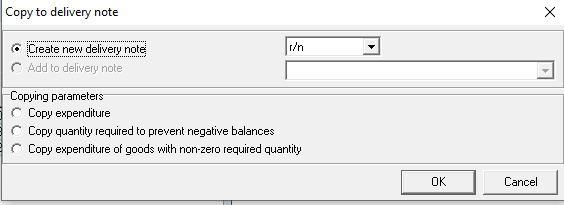
To create/add to a delivery note, click [OK]; to cancel the operation, click [Cancel].
If you agree to create a delivery note from the "Estimated Consumption", the system will open delivery notes of the selected type for each department separately;
If necessary, make changes to the delivery notes, activate the delivery notes, and save them.
Product copying parameters:
Create New Delivery Note — when the switch is set to this position, new delivery notes of the selected type will be created. The type must be selected from the drop-down list.
Add to Delivery Note — the switch will be available for selection if a delivery note is open, into which items need to be added.
Copy Consumption — when the switch is set to this position, all items from the "Estimated Consumption" will be added to the delivery note in the quantity from the "Consumption" column.

This option is convenient to use when copying items into delivery notes for writing off goods (writing off goods due to spoilage without processing a request) or internal transfers of goods (requesting goods from the main warehouse for banquet operations).
If the user has the right to enter prices in receipt/delivery notes but does not have the right "Use Last Receipt/Consumption Price" and price lists are not set, then prices in receipt/delivery notes must be entered manually.
If the user has the right to enter prices in receipt/delivery notes and has the right "Use Last Receipt/Consumption Price", or price lists are set, then prices in receipt/delivery notes will be set automatically according to the set rules.
Copy Quantity Required to Prevent Negative Balances — when the switch is set to this position, items from the "Estimated Consumption" for which the "Required" column is filled will be added to the delivery note, in the quantity from that column.

This option is convenient to use when creating delivery notes (receipt notes, internal transfers, reprocessing acts) to prevent the formation of compensated entries when processing the request.
When creating receipt notes, the user's rights for setting prices in receipt notes will be taken into account.
If the user has the right to enter prices in receipt notes but does not have the right "Use Last Receipt Price" and price lists are not set, then prices in receipt notes must be entered manually.
If the user has the right to enter prices in receipt notes and has the right "Use Last Receipt Price", or price lists are set, then prices in receipt notes will be set automatically according to the set rules.
Copy Consumption of Items with Non-Zero Required Quantity — when the switch is set to this position, items from the "Estimated Consumption" for which the "Required" column is filled will be added to the delivery note, and the quantity will be taken from the "Consumption" column.

This option is convenient to use when creating comparison statements to prevent the formation of compensated entries when processing the request.