Extended List of Payment Documents
The report "Extended List of Payment Documents" allows you to generate a list of payment documents and the delivery notes associated with them.
Extended List of Payment Documents - Filter
The filter for the "Extended List of Payment Documents" report: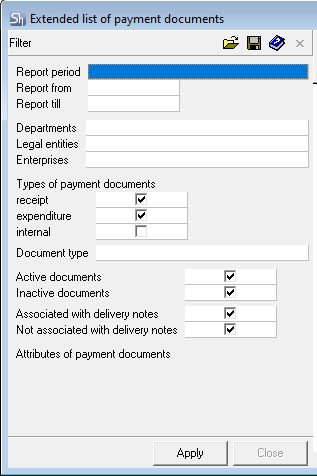
The filter parameters "Report from ... to...", "Departments", "Legal Entities", "Enterprises", "Report Currency" are filled in using standard methods.

If the report includes payment documents not linked to delivery notes (for determining departments for filtering), the visibility of payments in the report is determined by the legal entities available to the user. Determination of availability occurs relative to the departments permitted to the user via department groups.
Additional filter fields:
Types of Payment Document – in this area of the filter, mark the required types of payment documents: receipt, expense, and/or internal;
Document Type – if the list of payment documents needs to be filtered by type, then in this field select the document type from the drop-down list;
Active/Inactive Documents – select which documents (active and/or inactive) should be displayed in the report.
Associated with delivery notes / Not Associated with delivery notes – select which documents should be displayed in the report.
Currency of Payment Documents – select from the list the currency in which payment documents should be displayed in the report;
After filling out the filter, click the [Apply] button.
Extended List of Payment Documents - Content
The table of the "Extended List of Payment Documents" report:

If one payment document was created to pay for several delivery notes, then in the report, all linked delivery notes will be indicated for one row of the payment document.
If the payment document was created without an association with delivery notes (e.g., payment for services upon sale), then the "Delivery notes" fields for this document will not be filled.
Type – type of payment document;
Number – payment document number;
Date – payment document date;
Document Type – type of payment specified in the payment document;
Payer – the counterparty (own legal entity or correspondent) that made the payment according to the document;
Recipient – the counterparty (own legal entity or correspondent) that received the payment according to the document;
Amounts in Delivery notes (Sum e/t, VAT, Sum i/t) – total amount of delivery notes linked to the payment document;
Payment (Sum e/t, VAT, Sum i/t) – total payment amount;
Delivery notes
Type – type of delivery note associated with the payment document;
Number – number of the delivery note associated with the payment document
Date – date of the delivery note associated with the payment document
Amounts in Delivery notes (Sum e/t, VAT, Sum i/t) – amount of the invoice linked to the payment document;
Payment (Sum e/t, VAT, Sum i/t) – payment amount for the specific delivery note. If there are several delivery notes, the distribution of payment amounts across delivery notes occurs;
Acct. Operation – the name of the accounting operation assigned to the payment document;