The report contains a list of all documents in which goods from the selected group appear. Also, the table displays data on the change in goods stock after document creation.
Goods Group Movement - Filter
Filter for the Goods Group Movement report:
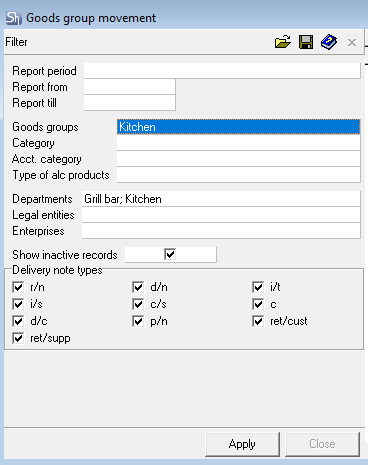
Parameters of the report filter "Report From ... To...", "Departments", "Legal Entities", "Enterprises", "Goods Groups", "Category", "Accounting Category", "Type of Alc. Products" are filled using standard methods.
Additional filter fields:
Show Inactive Records — by setting/clearing this flag, the mode of displaying delivery notes can be set — including /excluding inactive documents.
Types of Delivery Notes — in this area, you can select the types of delivery notes for which the report needs to be generated.
After filling the filter, to generate the Goods Group Movement report, press the [Apply] button.
Goods Group Movement - Content
Goods Group Movement report:
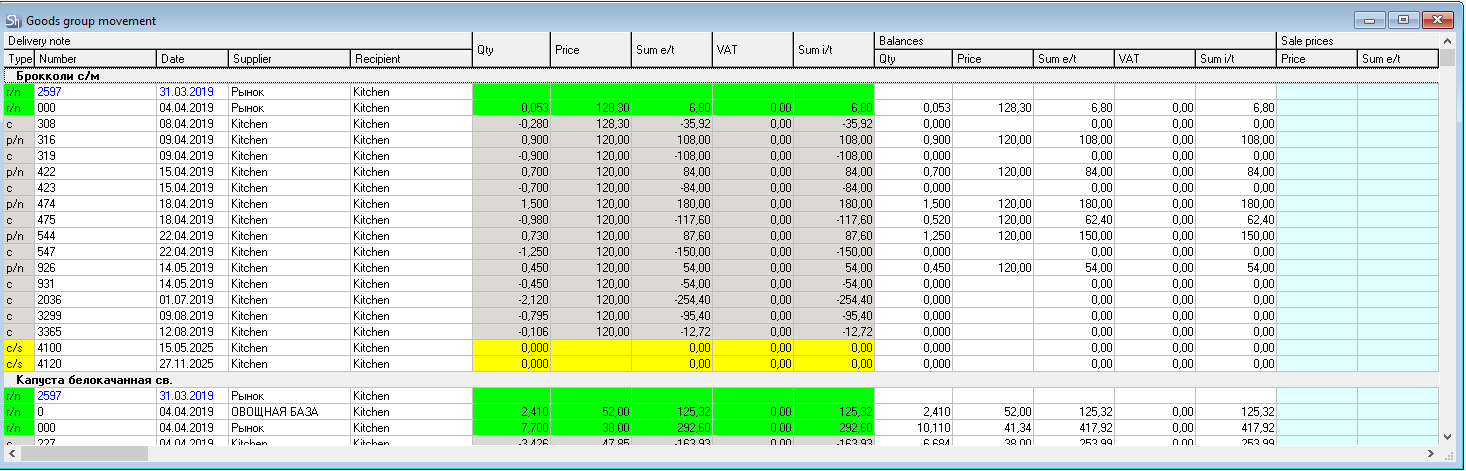
The report is grouped by goods items from all goods groups included in the group selected in the report filter. The list of goods is sorted in alphabetical order.
The report table contains the same columns as the "Goods Movement" report.
Additionally, in the "Goods Group Movement" report, the column "Stock — Compensated Quantities/Amounts" can be displayed - in this group of columns, the total accumulated quantity and amounts for all compensated entries for this goods item will be displayed. This column will take into account quantities even for types of delivery notes not selected in the filter.