The Receipts Report ("Income Report") allows you to display a list of all receipt delivery for the reporting period. This report can be used for reconciliation with suppliers, as the report allows sorting by any of the displayed columns.
The report displays information from the titles and line items of receipt delivery notes. An additional filter for alcohol allows you to display only alcoholic products in the report for analysis.
Receipts Report - Filter
The filter for the Receipts Report:
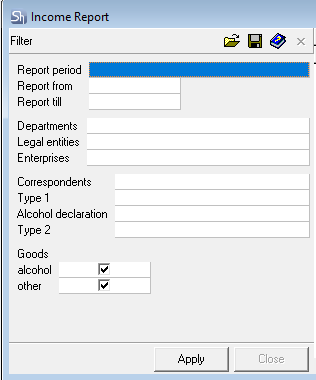
The filter parameters "Report from ... to...", "Departments", "Legal Entities", "Enterprises", "Correspondents" are filled in using standard methods.
Additional filter fields:
Goods — Alcohol/Other – use the flags to define for which types of goods the report needs to be generated.
Alcohol – this product group includes all goods for which the "Alcoholic Product" flag is set in the product card.
Other – goods without the "Alcoholic Product" flag.
After filling out the filter, to generate the receipts report, click the Apply button.
Receipts Report - Content
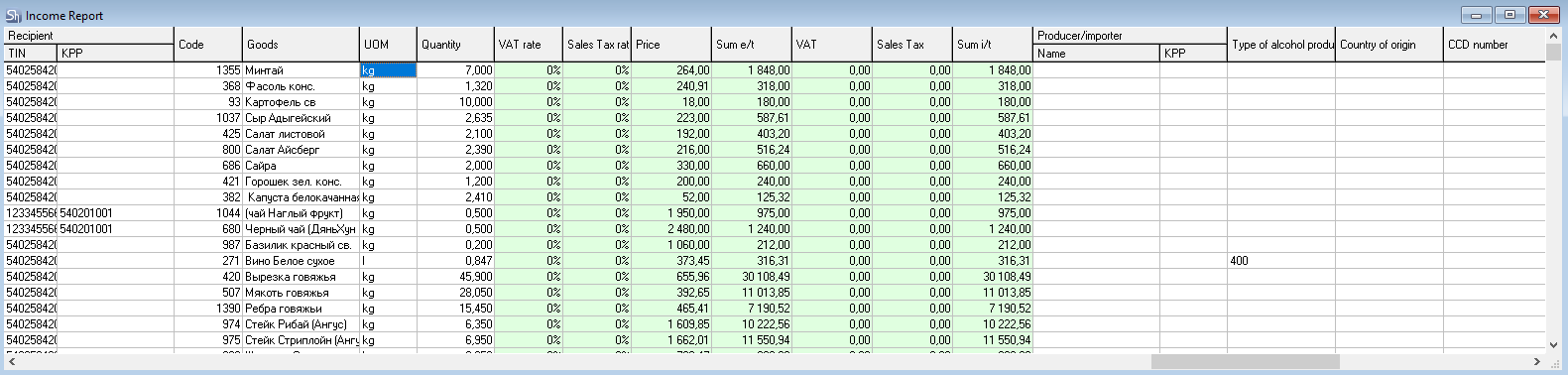
Receipts Report:
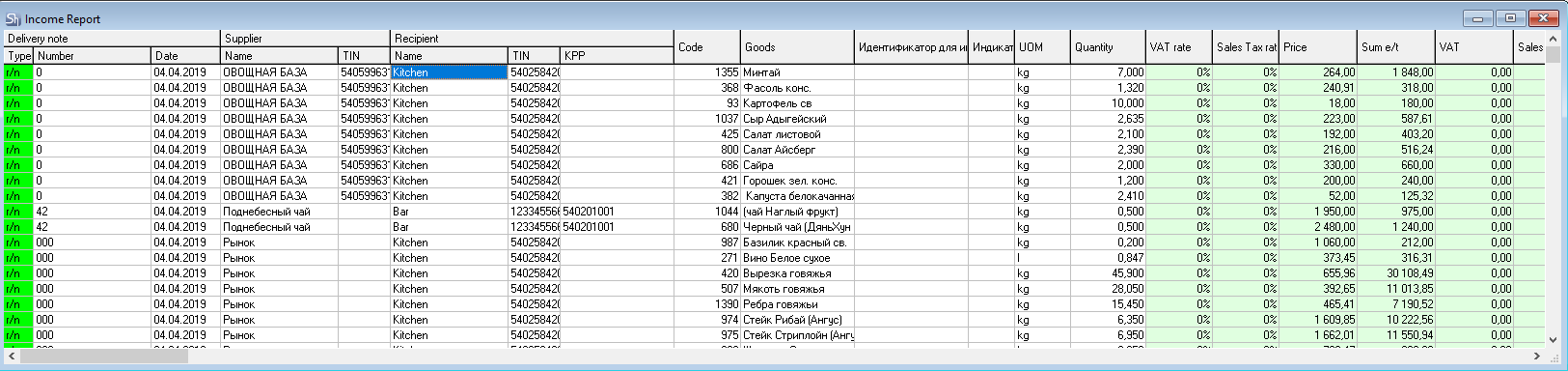
Delivery note (number and date) – date and number of receipt delivery notes on which the report is based
Supplier (Name, TIN, TRC) – supplier parameters from receipt delivery notes.
Recipient (Name, TIN, TRC) – parameters of the department to which the goods from the receipt delivery notes in the report were received.
Code, Product – code and name of r_k StoreHouse Pro goods participating in the receipt delivery notes of the report.
UOM – units of measurement of goods specified in the receipt delivery notes.
Quantity – quantity in units of measurement of goods in the receipt delivery notes.
Manufacturer/Importer – if a "Manufacturer/Importer" is specified in the delivery notes for alcoholic products, then this field will display the "name + TRC" of this correspondent.
Type of Alcoholic Products – code of the type of alcoholic product. The value is filled from the receipt delivery note. If the value is not defined in the receipt delivery note, the value will be taken from the product card.
Country of Origin – country of origin of the goods specified in the receipt delivery note.
Customs Declaration Number – customs declaration number for the goods specified in the receipt invoice.
Extended List of Delivery notes
To analyze receipts including amounts, you can use the Extended List of Delivery notes report. The report shows the entire list of documents with details of the goods in each delivery note. To do this, you need to configure the filter for receipt delivery notes. The price can be calculated in the layout; use the built-in FastReport layout editor for this.
Delivery notes can also be sorted by period, legal entities, enterprises, departments, and correspondents. Read more in the article Extended List of Delivery notes.