Methods for Correcting Negative Values in the Estimated Expenditure
The system allows processing requests with insufficient goods quantity at the time of write-off. Compensated entries will be automatically generated – the missing quantity of goods required for write-off will be posted. As a result of the write-off based on the request, the balance for such goods will be zero.
These entries are always linked to delivery notes and appear in reports. This is the "saved" surplus.
If the accounting practices of the organization do not allow such processing of "negative balances," the system provides a number of actions that will prevent the formation of compensated entries during write-off. The preliminary result of applying these actions can be seen in the "Estimated expenditure".
Correcting Errors in the Set
An incorrect value for goods write-off was specified when creating the set. For example, the goods unit of measurement was not taken into account when adding it to the set.
Method to сorrect:
Identify the inclusion of the goods in the set and correct the incorrect value in the "Gross" field.
If the set has already been used in write-offs, it is recommended to correct the error in all documents where the erroneous set was used. When making changes to a set that is already used in delivery notes, the system will request confirmation to change the delivery notes retroactively, which in turn requires the user making the changes to have the appropriate rights for modification.

Such corrections to sets will lead to changes in the quantitative and monetary balances of already processed periods.
If changes in all documents are not permissible, for example, the period is closed, reports are submitted, in such cases it is recommended to enter a new validity period for the set for which there have been no write-offs yet or for which accounting reports have not been generated from that date. And make changes to this period.
Goods Savings — Changing the Set
If the quantity of goods in the set and in the expenditure is correct, but the goods are insufficient due to savings, changes can be made to the set for a single date.
Method of correction:
Identify the inclusion of the goods in the set. Open the set and change the validity period. The validity period is changed for one day. For example, a difficulty arose when processing the date 06/01/17. In the set, set a new date 06/01/17, save the set. Then set the date 06/02/17 and save the set again. Then click on  and select the validity period from 06/01/17 to 06/01/17. In this period, make adjustments (for example, reduce the norm for the item "Lemon"). Thus, for 06/01/17, the quantity of goods "Lemon" written off will be less, and from 06/02/17, the version of the set that was before the changes will be in effect.
Insufficient Goods Quantity in the Department's Balance
Delivery notes for goods supply (Receipt Note or Internal Transfer) have not been created for the department for which the request is being processed.
Method of correction:
Create the missing delivery notes. If the period is not closed, the system allows entering documents retroactively, which leads to changes in the quantitative and monetary balances of goods in departments.
Posting the Missing Quantity
If the quantity of goods in the set and in the expenditure is correct, but the goods are insufficient in the department's balance due to savings, receipt notes can be created to cover the missing quantity of goods.
Each receipt note must be supported by a paper document with the seal and signature of the supplier and recipient. We do not recommend creating receipt notes to prevent the formation of compensated entries.
Method of correction:
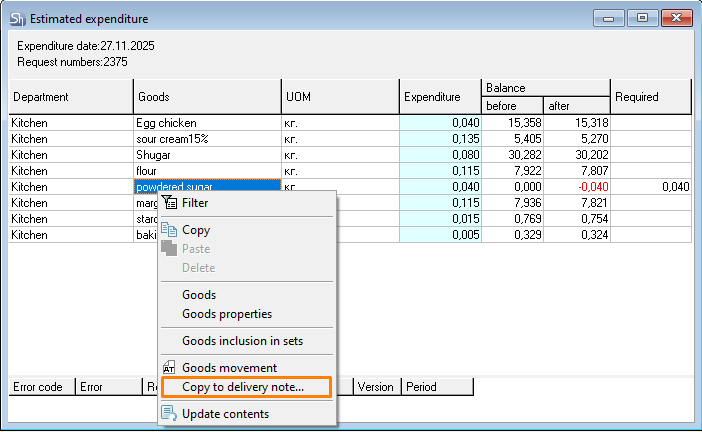
In the Estimated expenditure window, call the context menu and select the "Copy to Delivery Note" item.
The copy window must be filled out.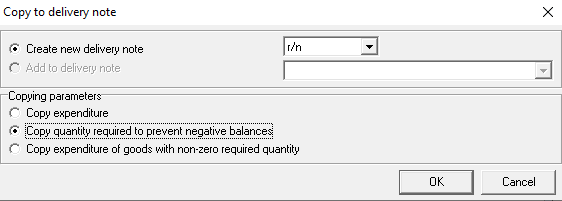
After clicking the [OK] button, the program will automatically create a "Receipt Note" document for each department, where the quantity of goods will correspond to the "Required" column of the "Estimated expenditure" window.
If the user has the right to enter prices in receipt notes, but does not have the right "Use Last Receipt Price" and price lists are not set, then the prices in the receipt notes must be entered manually.
If the user has the right to enter prices in receipt notes and has the right "Use Last Receipt Price", or price lists are set, then the prices in the receipt notes will be set automatically according to the specified rules.
Copying the Missing Quantity to the Comparison Sheet.
If the quantity of goods in the set and in the expenditure is correct, but the goods are insufficient in the department's balance due to savings, comparison sheets can be created to cover the missing quantity of goods. I.e., before writing off goods when processing the request, the required balance of goods will be recorded using a comparison sheet for writing off goods to a zero balance.
Method of correction
In the Estimated expenditure window, call the context menu and select the "Copy to Delivery Note" item.
The copy window must be filled out.
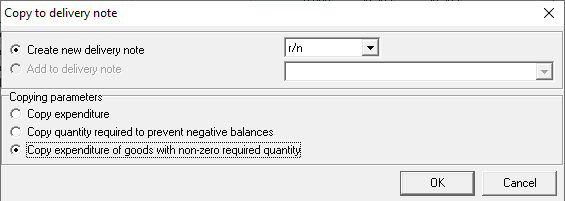
After clicking the [OK] button, the program will automatically create a "Comparison Sheet" document for each department. The list of goods in the document will be formed based on the goods from the "Estimated expenditure" report for which the "Required" column was filled. The quantity of goods in the delivery note will correspond to the "Expenditure" column of the "Estimated expenditure" report.
The price for surpluses in the delivery notes will be taken from the last written-off receipt for the department. The price can also be set manually after saving the document on the "Surpluses/Shortages" tab in the "Price of Surpluses" field.
Using Interchangeable Goods
If the quantity of goods in the set and in the expenditure is correct, but the goods are insufficient in the department's balance, then interchangeable goods can be used. If there are goods from the interchange group in the department's balance, the system will automatically, according to the set rules, write off the substitute goods in the required quantity.
Method of correction
Create groups of interchangeable goods.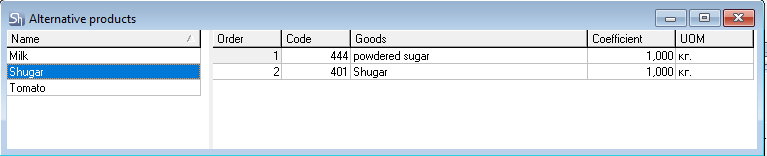
Specify the interchangeable substitutions groups in the sets of goods for which interchangeable substitutions can be applied.
In the filter of "Estimated expenditure" or in the "Write-off" filter, set the flag "use interchangeable substitutions". We will consider further work using the example of "Estimated expenditure".
The Estimated expenditure shows that 40 grams of "powdered sugar" are needed for correct write-off. The department's balance has 0 grams. But the balance has goods that can be used for replacement.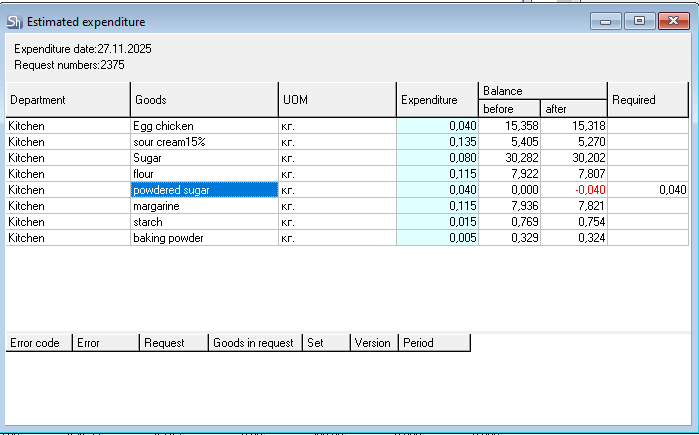

When setting the "use interchangeable substitutions" flag, the system automatically starts using the specified interchange rules. Since the goods "powdered sugar" are insufficient for a complete replacement of the main ingredient, after the complete write-off of the goods "powdered sugar", the system moves to the balances of the next goods from the interchangeable substitutions group, "Sugar".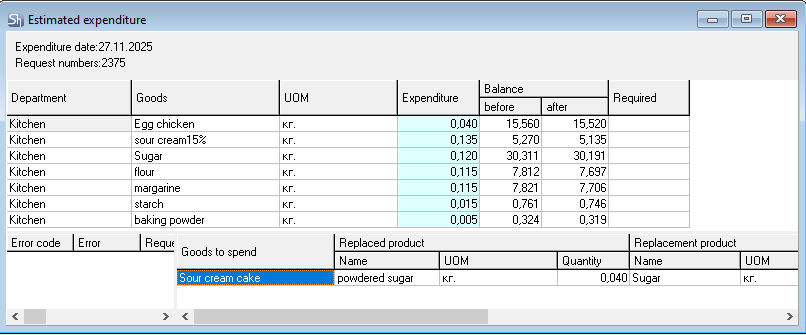
The entire list of substitutions made can be seen in the lower right part of the "Estimated expenditure" window.
When creating a set with the "use interchangeable substitutions" flag, the same ingredients and in the same quantity as indicated in the "Estimated expenditure" will be written off.
