Online balances - Content
The "Online balances" report: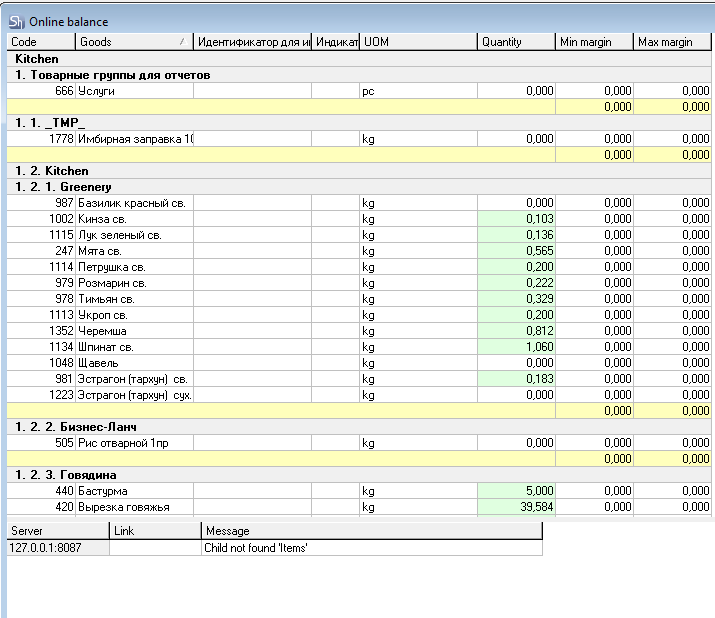
The window is divided into two parts:
The upper part contains information about quantitative balances.
The lower part contains a list of errors that prevented the full processing of expenditure from r_keeper V7.
If there are entries with errors in the lower part of the report, the generated report cannot be considered completely reliable. It is necessary to correct all errors.
Server — The IP and port for connecting to QushSvc.exe, specified during configuration in the enterprise properties.
Connection — The name of the connection from QushSvc.exe used to connect to the r_keeper V7 database.
Message — The error text.
Frequently encountered errors:
Connection refused — The QushSvc.exe specified in the enterprise settings is not running.
Write-off Department not defined for the Goods item (Goods item name) — In the r_keeper dish expenditure, there is a dish for which the write-off department is not defined in r_k StoreHouse Pro for the sale location on the product card. Define the write-off department and refresh the report.
Goods item not found by GUID — In the r_keeper dish expenditure, there is a dish that has not yet been imported into r_k StoreHouse Pro (a new dish). It is necessary to perform an import of Goods to update the directories in r_k StoreHouse Pro. And create a set if the dish requires preparation.
Modifier not found by GUID for Goods item (Goods item name, for which the problematic modifier appears in the r_keeper dish Expenditure) — In the r_keeper dish Expenditure, there is a modifier that has not yet been imported into r_k StoreHouse Pro (a new modifier). It is necessary to perform an import of Goods to update the directories in r_k StoreHouse Pro. And fill out the set if the modifier requires the write-off of ingredients.
If a set is not defined for a goods item from the r_keeper dish expenditure, the set is empty, or the set for a semi-finished product is empty, no error message will appear in the report log.
The report area contains a list of goods from the Goods Group specified in the filter, with the calculated balance at the current moment, taking r_keeper sales into account.
Additional report groupings can be set in the filter. The Figure shows an example of a report grouped by departments. I.e., the report displays balance for each department separately for the enterprise selected in the filter.
Code — contains the r_k StoreHouse Pro item number.
Goods — contains the name of the goods item.
The r_keeper dish expenditure is not displayed in the report. Only r_k StoreHouse Pro Goods, whose balance is accounted for at the enterprise, are shown.
UOM — the unit of measurement of the goods for report generation, or the base unit of measurement if the corresponding flag was set in the report filter.
Quantity — the quantitative balance of the goods item, calculated for "now" taking r_keeper sales into account. A cell with a red background indicates a balance less than the minimum stock. Green indicates a balance greater than the maximum stock.
A negative value in the "Quantity" field means that at the time of generating the "Online balances" report, this goods item was insufficiently stocked in the system to process the R-Keeper expenditure. And if write-off documents are generated for this expenditure, compensated entries will be created for the "negative" goods.
Min. Stock — the minimum stock of the goods item, specified on the product card for the Department from the filter. If N departments are specified in the filter and the grouping method "by Departments" is not selected, this field will display the total quantity of the minimum goods item stock across all departments selected in the filter.
Max. Stock — the maximum stock of the goods item, specified on the product card for the Department from the filter. If N departments are specified in the filter and the grouping method "by Departments" is not selected, this field will display the total quantity of the maximum goods item stock across all departments selected in the filter.