The filter for the "Online balances" report:
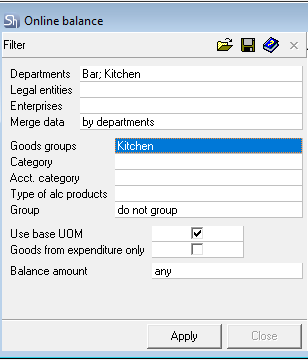
The report is generated for "now". Therefore, the filter does not allow setting a date.
The filter parameters "Departments", "Legal Entities", "Enterprises", "Goods Groups", "Category", "Acct. Category", "Type of Alcohol Products" are filled using standard methods.
Use base UOM — by default, all reports involving goods are generated in the units of measurement "for reports". The Online balances report can be generated in the "base" unit of measurement. To do this, check the corresponding flag in the filter.
Only Goods from Expenditure — when this flag is set, the report will only include Goods present in the composition of sold dishes or sold goods (without a Set), considering the selected Goods Group for report filtering.
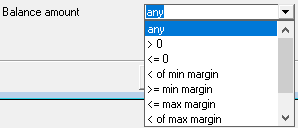
Balance Quantity — select from the drop-down list which goods items to display in the report based on their remaining quantity. Stock rules can be set on the Product cards.
After filling out the filter, to display the Online balances, click the Apply button.
At this moment, a request will be made to R-Keeper to retrieve sales.