Price Control Based on Price Lists
If supplier/buyer price lists are maintained in the database, this report allows you to analyze compliance with the terms of the price lists. And show the percentage and absolute deviation from the prices set in the price lists.
Price Control Based on Price Lists - Filter
The filter for the "Price Control Based on Price Lists" report:
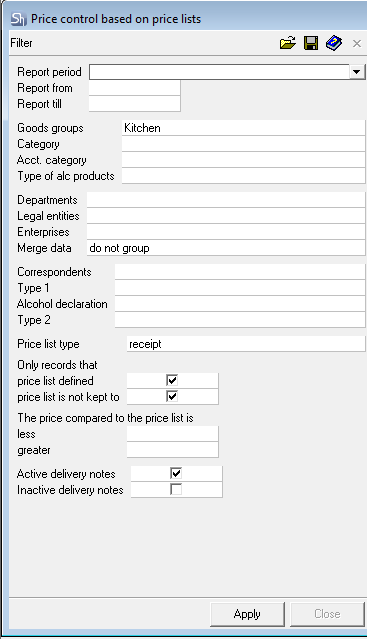
The filter parameters "Report from ... to...", "Departments", "Legal Entities", "Enterprises", "Product Groups", "Category", "Acct. Category", "Type of Alcoholic Products", "Correspondents" are filled in using standard methods.
Additional filter fields:
Price List Type – in this field, select for which delivery notes and price lists to conduct the analysis (receipt, expenditure, or internal).
Only entries for which a price list is defined – when this flag is set, the report will only include goods for which price lists are defined for the correspondents in the filter. If the flag is not set, the report will also display a list of goods for which the comparison will be between delivery note prices and prices in the product cards.
Only entries for which the price list is not complied with – when this flag is set, the report will only display goods whose delivery note prices fall outside the price and price range of the price list.
Price from the price list defined price is less than... more than... – the filter allows you to set the percentage deviation of delivery note prices from price list/product card prices. This corridor allows you to set a rule for what is considered a price deviation when generating the report.
Less Than – the value should be in the range from 0% to 100%.
More Than – the value should be in the range from 100% to 1000%.
To have the report include only items whose prices are lower than the price list/product card prices, the "More Than" field should be left blank. If it is necessary for the report to include only items whose prices are higher than the price list/product card prices, the "Less Than" field should be left blank. A filter for a blank field is considered inactive and data for the blank field does not enter the report.
When the parameters "Only entries for which the price list is not complied with", "Less Than", "More Than" are enabled simultaneously, the report includes items for which at least one condition is met.
Active/Inactive Delivery notes – check the flags for which delivery note statuses the report should be generated.
Price List Currency – in this field, define in which currency price lists the report should be generated.
After filling out the filter, to generate the report, click the [Apply] button.
Price Control Based on Price Lists - Content
The Price Control Based on Price Lists report:
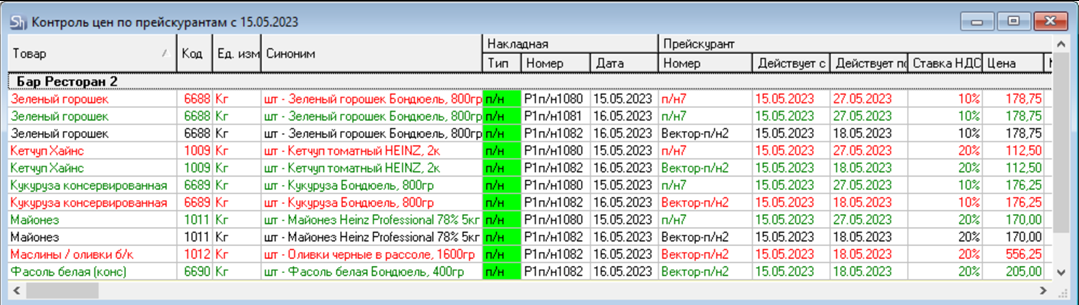
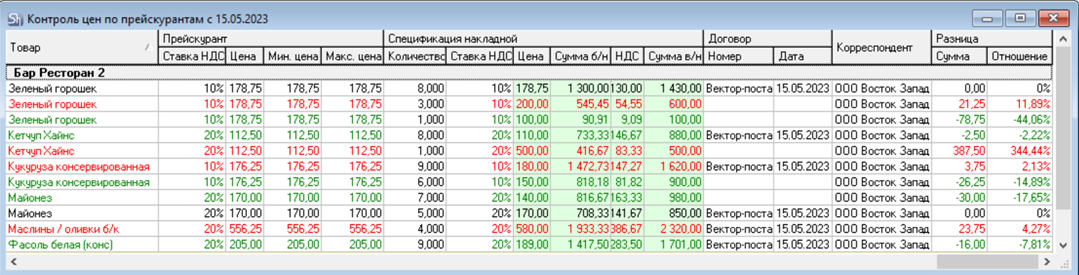
The figures show an example of a report grouped by department.
The report price (Price including taxes or Price excluding taxes) is set in the "Environment Settings".
Correspondent – supplier/buyer from delivery notes that participate in the report generation according to the set filter.
Department – own department from delivery notes that participate in the report generation according to the set filter.
Goods / Code / Unit – code, name, and unit of measurement of r_k StoreHouse Pro goods item for which price analysis is conducted according to the set filter.
Synonym – name of the supplier/recipient product. The field will be filled if this directory was used when creating delivery notes.
Delivery note (Type, Number, Date) – parameters of the delivery note that fell into the report according to the filter parameters.
Price List (Number, Effective From, Effective To, VAT Rate, Price, Min. Price, Max. Price) – parameters of the price list with which the delivery note data from the report is compared. The price list is determined by the rules for using the price list in delivery notes.
Delivery note Specificatioin (Quantity, VAT Rate, Price, Sum e/t, VAT, Sum i/t) – data from the delivery note for the product, which was analyzed in the report.
Contract (Number, Date) – number and date of the contract, if a contract is specified for the delivery note.
Difference — Amount – the amount difference between the delivery note price and the price list price.
Difference — Ratio – the percentage deviation of the delivery note price from the price list price.
Items that are above the maximum price list price or have other differences from the price list are highlighted in red: VAT Rate, Sales Tax Rate, Synonym.
Items that are below the minimum price list price are highlighted in green.