Production/Supply Plan Filter
Filter for the "Production/Supply Plan" report:
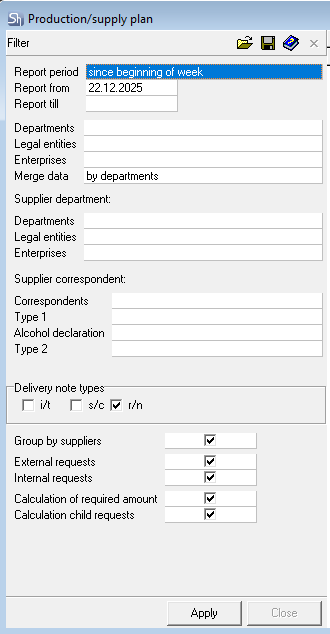
Report From ... and Report To ... — enter the period for which you need to generate the report in these fields.
To define the report generation period, you can use the predefined list of periods; for this, select a value in the "Report Period" field.
To clear a filled date field, select the corresponding field and choose the Delete context menu item or press the [Delete] button on the keyboard.
Department — the department that created the request. If you need to generate a report for a specific department, select the desired department (or several departments) from the directory.

Legal Entities — if the report should be built only for requests of certain own legal entities, select them from the list in this field.
Enterprises — in this field, you can define the enterprises for whose departments the production/supply plan will be built.
Merge Data — in this field, you can set the method for consolidating data in the report. Possible values: do not group, by departments, by legal entities, by enterprises.
Supplier Department (Department, Legal Entity, Enterprise) — the department (defined directly or through own legal entities or enterprises) that will fulfill the request, i.e., will organize the supply of the goods requested in the request to the recipient department. The supplier department is determined by the goods' routes. The rules for department accessibility based on user rights also apply to this filter.
Supplier Correspondent — in addition to departments, correspondents can be suppliers of goods for processing requests if "receipt notes" are specified in the goods' routes. To filter such goods, you can specify a correspondent in the filter.
Delivery Note Types (i/t, c, r/n) — define which routes using which delivery notes should be displayed in the report.
Delivery notes can be created from the report results without creating "child requests". To access this function from the report, only one of the delivery note types must be specified in the filter.
Group by Suppliers — when this flag is set, the report will be grouped by suppliers from the request routes.
External/Internal Requests — define for which requests the report will be generated. Setting one of the flags is mandatory.
Calculate Based on Required Quantity — this flag determines for which quantity of dishes in the request to generate the report: based on the consumption quantity or based on the "required receipt" quantity.
Calculated Child Requests — when this flag is set, creating child requests for report generation is not required. The report will display "calculated" information for all routes of the created requests. If the flag is cleared, the report will be generated only based on actual requests.
After filling out the filter, click the [Apply] button to generate the "Production/Supply Plan" report.