Purchase Book (by Payment)/(by Delivery)
This report displays information from delivery notes generated based on receipt delivery notes and returns from customers. The report is presented broken down by "VAT Rates".
By Payment – the report only includes delivery notes for paid delivery notes.
By Delivery – the report includes delivery notes for all delivery notes within the period specified in the filter.
Purchase Book (by Payment) / (by Delivery) - Filter
Both reports have the same filter. The filter:
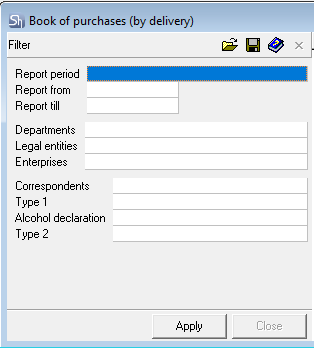
The filter parameters "Report from ... to...", "Departments", "Legal Entities", "Enterprises", "Correspondents" are filled in using standard methods.

"Purchase Book (by Payment)" is filtered by the payment dates of delivery notes. "Purchase Book (by Delivery)" is filtered by the dates of the delivery notes themselves.
After filling out the filter, to generate the report, click the [Apply] button.
Purchase Book (by Payment) - Content
Only invoices for paid delivery notes are included in the "Purchase Book (by Payment)". Amounts in the report are grouped by delivery date, payment date, and VAT rates. Report view:
Type – the type of delivery note for which the invoice was generated.
Number – invoice number;
Date of Invoice – invoice date;
Delivery Date – the date of the delivery note linked to the invoice. If several delivery notes with different dates are linked to the invoice, then different delivery dates will be displayed for one invoice in the report;
Payment Dates – the payment date of the delivery notes linked to the invoice (payment date). If the delivery note was paid in several stages, the dates and amounts of both payments will be displayed in the report;
Supplier – the supplier of the delivery note linked to the invoice;
Recipient – the recipient department from the delivery note;
VAT Rate – VAT rates of goods from the delivery notes for which the invoice was generated;
Sum e/t – amounts from the payment document, distributed by VAT rates;
VAT – VAT amount;
Sum i/t – amount including taxes.
Declaration Numbers – if the "Customs Declaration Number" was specified in the delivery notes for the goods, these numbers will be displayed in this field, broken down by the goods' "VAT Rates";
Purchase Book (by Delivery) - Content
"Purchase Book (by Shipment)" is generated based on all active invoices created for receipt delivery notes and returns from customers. Amounts in the report are grouped by delivery date and VAT rates. Report view:
Type – the type of delivery note for which the invoice was generated.
Number – invoice number;
Date of Invoice – invoice date;
Delivery Date – the date of the invoice linked to the invoice. If several delivery notes with different dates are linked to the invoice, then different delivery dates will be displayed for one invoice in the report;
Supplier – the supplier of the delivery note linked to the invoice;
Recipient – the recipient department from the delivery note;
VAT Rate – VAT rates of goods from the delivery notes for which the invoice was generated;
Sum e/t – amounts from the delivery notes, distributed by VAT rates;
VAT – VAT amount;
Sum i/t – amount including taxes.
Declaration Number – if the "Customs Declaration Number" was specified in the delivery notes for the goods, these numbers will be displayed in this field, broken down by the goods' "VAT Rates";