Request Processing — Write-off
For "Request Processing", it is necessary to create delivery notes that will change the quantitative balances of goods.
The "Write-off" function allows setting rules for generating delivery notes for external requests.
To create delivery notes based on external requests, select the necessary requests in the list, call the context menu and select the item "Write-off". A filter for generating delivery notes for the selected external requests will open.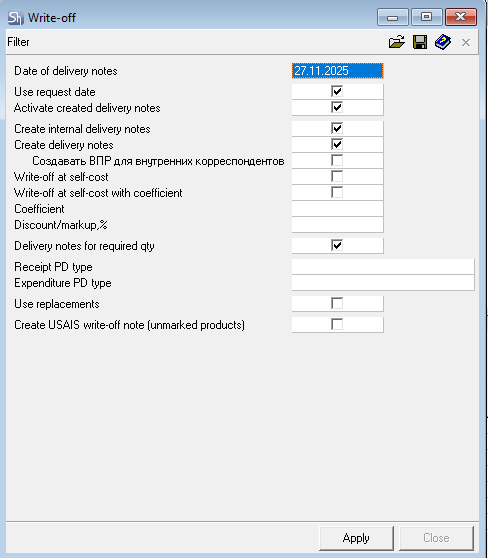
Use request date — if the flag is set, then delivery notes for the selected external requests will be created with the dates of the requests.
Date of delivery notes — if the "Use request date" flag is cleared, then delivery notes will be created with the date specified in this field. By default, the date of the last selected request is inserted.

Delivery notes will be created separately for each request.
Activate created delivery notes — when this flag is set, delivery notes will be created with the "Active" flag set. If additional restrictions on delivery note activation are triggered, the delivery notes will be created inactive.
Create internal delivery notes — when this flag is set, receipt documents will be created for the selected requests. If you only need to generate expenditure delivery notes, clear this flag.
Create delivery notes — when this flag is set, expenditure delivery notes will be created, i.e., the write-off will be performed in full. If you only need to generate production documents, clear this flag.
To process a request in full (generating receipt and expenditure documents), both flags must be set.
Create Internal Sale for internal correspondents — when this flag is set, an internal sale delivery note will be created instead of an expenditure delivery note. For this, it is also necessary to select an internal correspondent as the Customer when filling out the request, who is matched with a Department in the system.
Write-off at Cost Price ("Write-off at self-cost") — when this flag is set, expenditure delivery notes will be written off at cost price (the sale amount of the delivery notes will be equal to the cost amount).
Write-off at Cost Price with Coefficient ("Write-off at self-cost with coefficient") — this setting allows creating expenditure delivery notes and internal sales with a sale price calculated from the cost price with a coefficient. When this flag is set, the following fields are activated:
Coefficient — the value by which the cost price of goods in the resulting expenditure delivery note will be multiplied to calculate sale prices. Positive values only.
Discount/Markup, % - the percentage expression of the coefficient that will be used in calculating the sale prices of goods in the expenditure delivery note. Negative value — discount (less than cost price), positive value — markup (greater than cost price).
Both fields are dependent. Setting the coefficient calculates the discount/markup and vice versa.
When changing the cost price of documents retroactively, the sale amounts of expenditure delivery notes written off at cost price with a coefficient are NOT automatically recalculated.
Delivery Notes for Required Qty — when this flag is set, receipt documents (Assembly/Internal Transfer) will be created for the quantity from the field "Receipt Quantity for Request Fulfillment".
Receipt PD Type / Expenditure PD Type — define the type of payment documents to be created for processing services.
After filling out the filter, click the [Apply] button to generate delivery notes for the requests.
Use Replacements flag — (Use Interchangeable Substitutions) the flag determines whether to apply the interchange groups assigned to sets in case of a shortage of the main set ingredient when creating assemblies for processing requests.
Create USAIS Write-off Act (unmarked products) flag — when this flag is set, a USAIS Write-off Act for non-marked products will be created, based on an External Request. (rus. EGAIS — USAIS (Unified State Automated Information System))
The resulting delivery notes will be displayed in a separate window with a protocol if there were uncorrected errors during the delivery note generation process.
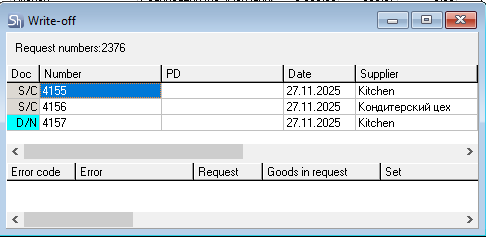
Delivery notes created based on requests are available for editing.