Sale of Receipts
Sale of Receipts is a report showing the consumption of goods indicating the receipt delivery note where they were received. For each sold item, it is indicated how much of it was taken from a specific receipt delivery note.
Sale of Receipts - Filter
The filter for the Sale of Receipts report:
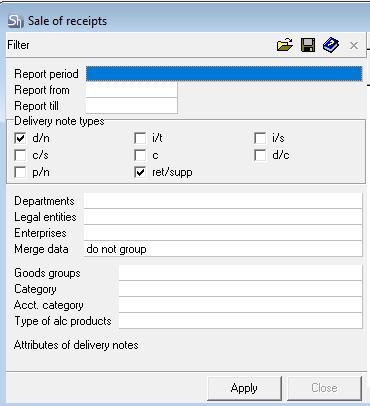
The filter parameters "Report from ... to...", "Departments", "Legal Entities", "Enterprises", "Goods Groups", "Category", "Acct. Category", "Type of Alc Products", "Report Currency" are filled in using standard methods.
Additional filter fields:
Delivery note Types – check the boxes for the types of documents you want to view;
After filling out the filter, to generate the Sale of Receipts report, click the [Apply] button.
Sale of Receipts - Content
The table of the Sale of Receipts report without grouping:
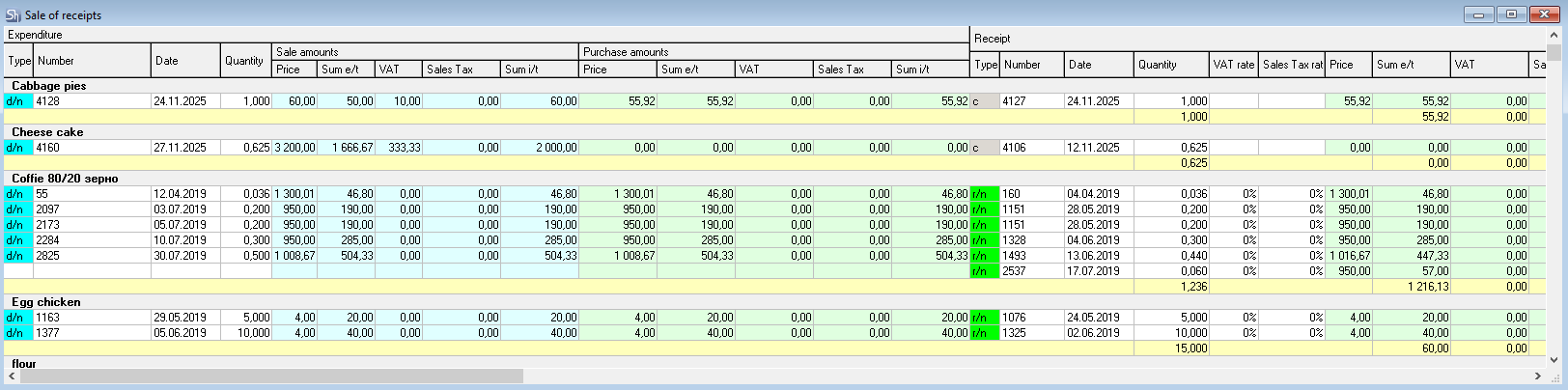
Expenditure – this part of the table shows all expense documents for the department defined in the filter and contains the following columns:
Type – this field indicates the document type;
Number – this field shows the document number;
Date – this field contains the document date;
Quantity – this column indicates the quantity of goods according to the delivery note.
Sale Amounts – this area of the table contains the following columns for the sales amount:
Price – sales price of the goods;
Sum e/t – amount from the expense document excluding taxes;
VAT – value-added tax amount from the expense document;
Sales Tax – sales tax amount from the expense document;
Sum i/t – amount from the expense document including taxes.
Purchase Amounts – this area of the table contains the following columns for the purchase amount:
Price – purchase price of the goods;
Sum e/t – amount from the receipt document excluding taxes;
VAT – value-added tax amount from the receipt document;
Sales Tax – sales tax amount from the receipt document;
Sum i/t – amount from the receipt document including taxes.
Receipt – this part of the table shows the receipt documents related to the expense documents indicated in the Expense part of the table and contains the following columns for the receipt documents:
Type – this field indicates the type of receipt document;
Number – this field shows the receipt document number;
Date – this field contains the receipt document date;
Quantity – this column indicates the quantity of goods "taken" from the specified receipt delivery note and "consumed" according to the expense document indicated in the Expenditure part of the table in this row. If the quantity of goods in the receipt delivery note was less than indicated in the expense document, then the next row indicates another receipt document from which the missing quantity of goods was "taken". Several receipt documents can be indicated for one expense document;
Price – price of the goods in the receipt document;
Sum e/t – amount from the receipt document excluding taxes.
VAT – value-added tax amount from the receipt document.
Sales Tax – sales tax amount from the receipt document.
Sum i/t – amount from the receipt document including taxes.