Step Balance Statement
The Step Balance Statement provides data on goods stock at the selected department or departments, indicating prices, amounts, taxes for goods, with the ability to break down the data into intervals. This allows analyzing stock in the context of repeating intervals, for example, a report on stock as of every Sunday morning of the month. This report will help forecast product purchases. For each product in the Step Balance Statement, the References to goods (Goods Movement) report can be invoked. To do this, call the context menu from the row with the desired product and select the command References to goods.
Step Balance Statement - Filter
The balance statement filter is shown in the screenshot: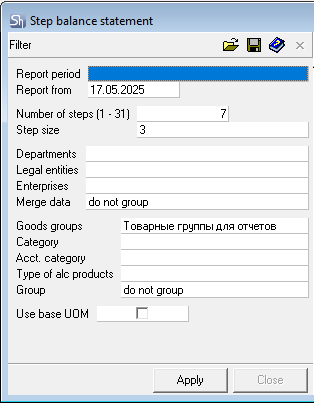
Parameters of the report filter Report From, Departments, Legal Entities, Enterprises, Goods Groups, Category, Accounting Category, Type of Alc. Product, and Report Currency are filled using standard methods.
Additional filter fields:
Number of Steps (1-31) — how many intervals from the start date (Report From...) to analyze for report generation; a numerical value from 1 to 31 must be entered.
Step Size — defines the frequency (distance) of intervals — week, month, quarter, year; it is also possible to specify a numerical value.
Use Base UOM — by default, all reports involving goods are generated in units of measurement "for reports". The Step Balance statement can be generated in the "base" unit of measurement. To do this, set the corresponding flag in the filter.
The fields Report From..., Number of Steps (1-31), Step Size determine how to build the array of intervals for the report.
Example of defining intervals in the filter: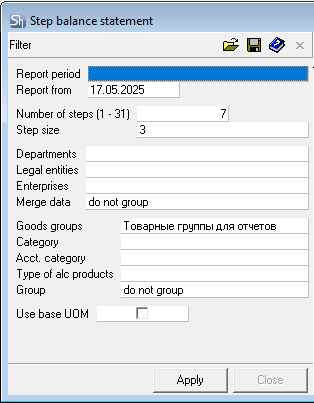
Let's say, it is necessary to analyze every Sunday in July. For this, in the Report From field, specify the date of the first Sunday in July, Number of Steps (1-31) is equal to the number of Sundays in the month, Step Size is equal to the interval between Sundays, i.e., specify 7 days or select Week from the dropdown list.
Thus, the balances will be generated for the dates:
- 03.07.2022
- 10.07.2022
- 17.07.2022
- 24.07.2022
- 31.07.2022.
Balances will be displayed as of the morning of each date from the array.
Step Balance statement - Content
The Step Balance statement window is shown in the screenshot:
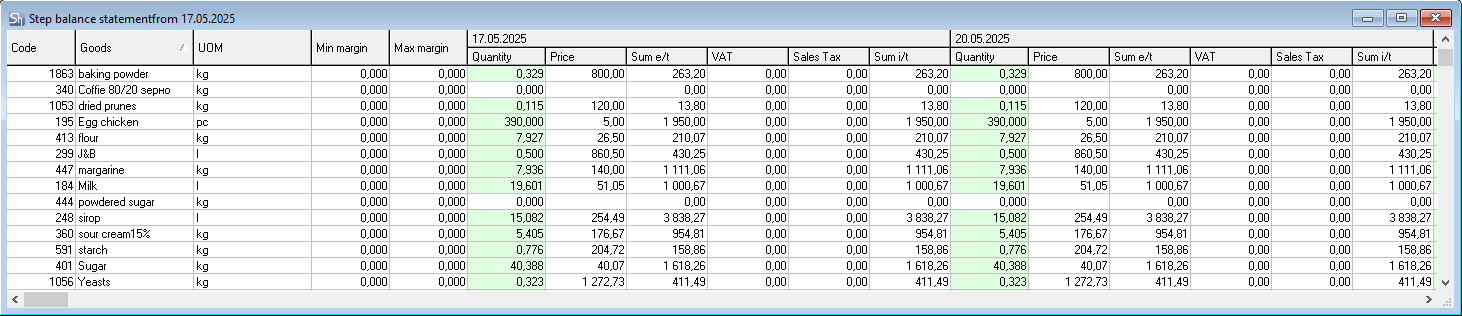
The field horizontally at the top displays the report intervals.
Code — contains the item number of the goods item in the goods dictionary.
Goods — contains the name of the goods item.
UOM — unit of measurement of the goods item for generating reports or the base unit of measurement if the corresponding flag was set in the report filter.
Quantity — quantity of the goods item in stock. A cell with a red background indicates stock less than the minimum margin (stock level). Green — greater than the maximum margin (stock level).
Price — in this field, the cost price of the goods item is indicated, calculated using the FIFO method.
Sum e/t — amount excluding taxes for the goods item stock, calculated using the FIFO method.
VAT — this column indicates the amount of value-added tax for the goods item stock, calculated using FIFO based on receipt notes.
Sales Tax — this column indicates the amount of sales tax for the goods item stock, calculated using the FIFO method based on receipt notes.
Sum i/t — amount including taxes for the goods item stock, calculated using the FIFO method.
Min. margin (stock) — minimum stock of the goods item, specified on the product card for the department from the filter. If N departments are specified in the filter and the grouping method "by departments" is not selected, then this field will display the total quantity of the minimum goods item stock for all departments selected in the filter.
Max. margin (stock) — maximum stock of the goods item, specified on the product card for the department from the filter. If N departments are specified in the filter and the grouping method "by departments" is not selected, then this field will display the total quantity of the maximum goods item stock for all departments selected in the filter. Minimum and maximum goods item margins (stock levels) are set for the base unit of measurement on the product card.
If the report is generated in units of measurement "for reports", and for the goods item this unit of measurement does not correspond to the "base" one, then the margin (stock) in the report will be recalculated into the unit of measurement "for reports".
If the values of the minimum and maximum goods item margins (stocks) are not set on the product card, then the minimum value = 0, the maximum — unlimited, and the field will remain "unfilled". With an "unfilled" maximum margin (stock) for at least one row in the report, it is impossible to calculate the "Total" for this field in the table.