Turnover Balance Report
This report allows you to evaluate the total goods flows for various types of movement for goods of a certain category, goods group, or department (departments).
The report form contains areas: Opening Balances, R/n (Receipt Notes), D/n (Delivery Notes), D/n-Compensated Q-ty/Amounts, D/n-Sales, I/t (Internal Transfers), I/t-Expenditure, I/t-Receipt, I/t-Compensated Qty/Amounts, R/r (Reconciliation Reports), R/r-shortage, R/r-surpluse, Compensated Qty/Amounts, C (Set Assembly "Complectation"), C-Expenditure, C-Receipt, C-Compensated Qty/Amounts, D/c (Set Disassembly), D/c-Expenditure, D/c-Receipt, D/c-Compensated Qty/Amounts, P/n (Processing note), P/n-Expenditure, P/n-Receipt, P/n-Compensated Qty/Amounts, Ret/cust (Returns from Customer), Ret/supp (Returns to Supplier), R/s-Compensated Qty/Amounts, Closing Balances.
For each goods item in the Turnover Balance Report, the Goods Movement report can be invoked. To do this, call the context menu from the row with the desired goods item and select the command "Goods Movement".
Turnover Balance Report - Filter
Filter for the Turnover Balance report:
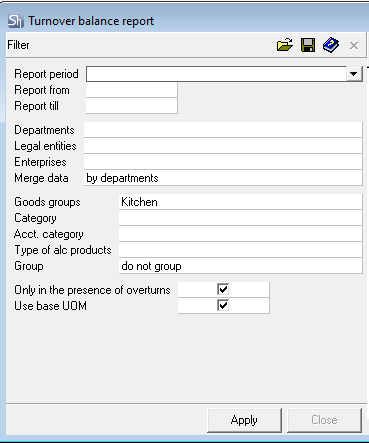
Parameters of the report filter "Report From ... To...", "Departments", "Legal Entities", "Enterprises", "Goods Groups", "Category", "Acct. Category", "Type of Alc. Product", "Report Currency" are filled using standard methods.
Additional filter fields:
Only With Turnover — when this flag is set, only goods items for which documents were generated in the period from the filter and for the departments from the filter will appear in the report.
Use Base UOM — by default, all reports involving goods are generated in units of measurement "for reports". The "Turnover Balance" report can be generated in the "base" unit of measurement. To do this, set the corresponding flag in the filter.
After filling the filter, to generate the turnover statement, press the [Apply] button.
Turnover Balance Report - Content
Turnover Balance Report:



In each row of the table, data for a separate goods item is displayed. In each area of the table "header", aggregated data for this goods item for the corresponding document type or type of stock (opening or closing) are displayed.
Data in each area of the table "header" are displayed by quantity, price, sum e/t (sum excluding taxes), sum of VAT (value-added tax), sum of Sales Tax (sales tax), sum i/t (sum including taxes). The form of table presentation can be configured arbitrarily.
Data on monetary amounts are displayed in the currency selected in the filter.
Opening Balances — in this area of the table "header", the stock for the goods item at the beginning of the period is indicated, in accordance with the established filter settings (department or goods group).
Legal Entity, Enterprise, Department — these fields are filled with values specified in the filter in case of selecting the value by departments in the filter field Merge Data. As a result of such settings, the turnover statement will have a form similar to that shown in the figure: R/n — in this area of the table "header", the total quantity of receipts of this goods item via receipt notes is indicated.
D/n — in this area of the table "header", the total quantity of expenditures via delivery notes of this goods item is indicated.
D/n-Compensated Qty/Amounts — in this area of the table "header", the total quantity of the goods item in compensated entries for delivery notes is indicated.
D/n-Sales — in this area of the table "header", the average sale price of the goods item in delivery notes and the total sale amounts are indicated.
I/t — in this area of the table "header", you can see the total quantity of the goods item in internal transfers for this goods item in accordance with the established filter settings.
I/t-Expenditure — in this area of the table "header", you can see the total quantity of the goods item shipped via internal transfers from the considered department specified in the filter settings.
I/t-Receipt — in this area of the table "header", you can see the total quantity of the goods item received via internal transfers by the considered department specified in the filter settings.
I/t-Compensated Qty/Amounts — in this area of the table "header", the total quantity of the goods item in compensated entries for internal transfers is indicated.
R/r — in this area of the table "header", the total quantity of the goods item in reconciliation statements in accordance with the established filter settings is indicated.
R/r-Shortage — in this area of the table "header", the total quantity of shortage of the goods item in reconciliation statements in accordance with the established filter settings is indicated.
R/s-Surpluse — in this area of the table "header", the total quantity of surplus of the goods item in reconciliation statements in accordance with the established filter settings is indicated.
Compensated Q-ty/Amounts — in this area of the table "header", the total quantity of the goods item in all compensated entries is indicated.
C — in this area of the table "header", the total quantity of the goods item in set assembly ("complectation") documents in accordance with the established filter settings is indicated.
C-Expenditure — in this area of the table "header", you can see the total quantity of the goods item written off using Set Assembly ("Complectation") documents from the considered department specified in the filter settings.
C-Receipt — in this area of the table "header", you can see the total quantity of the goods item received using Set Assembly ("Complectation") documents by the considered department specified in the filter settings.
C-Compensated Qty/Amounts — in this area of the table "header", the total quantity of the goods item in compensated entries for Set Assembly ("Complectation") documents is indicated.
D/c (Set Disassembly "Decomplectation") — in this area of the table "header", the total quantity of the goods item in set disassembly documents in accordance with the established filter settings is indicated.
D/c-Expenditure — in this area of the table "header", you can see the total quantity of the goods item written off using Set Disassembly ("Decomplectation") documents from the considered department specified in the filter settings.
D/c-Receipt — in this area of the table "header", you can see the total quantity of the goods item received using Set Disassembly ("Decomplectation") documents by the considered department specified in the filter settings.
D/c-Compensated Qty/Amounts — in this area of the table "header", the total quantity of the goods item in compensated entries for Set Disassembly ("Decomplectation") documents is indicated.
P/n — in this area of the table "header", the total quantity of the goods item in processing notes in accordance with the established filter settings is indicated.
P/n-Expenditure — in this area of the table "header", you can see the total quantity of the goods item written off using Processing Note documents from the considered department specified in the filter settings.
P/a-Receipt — in this area of the table "header", you can see the total quantity of the goods item received using Processing Note documents by the considered department specified in the filter settings.
P/a-Compensated Qty/Amounts — in this area of the table "header", the total quantity of the goods item in compensated entries for Processing Note documents is indicated.
Rett/cust — in this area of the table "header", the total quantity of the goods item in Return from Customer documents in accordance with the established filter settings is indicated.
Rett/supp — in this area of the table "header", the total quantity of the goods item in Return to Supplier documents in accordance with the established filter settings is indicated.
Rett/supp-Compensated Qty/Amounts — in this area of the table "header", the total quantity of the goods item in compensated entries for Return to Supplier documents is indicated.
Closing Balances — in this area of the table "header", the stock for the goods item at the end of the period is displayed, in accordance with the established filter settings.