Quick start
Integrator's Journey: From Request to Launch with White Server (for Restaurants and Cafes)
Document Purpose: To guide the integrator through the process from the initial inquiry to a fully functional integration ready for sale through the r_keeper dealer network.
Inquiry Email for New Integrators: integrations@rkeeper.ru
What to send:
- Subject: [Company Name] – Integration Request with WS
- Email body:
- Status: Integrator / Software Developer
- Company details
- Brief description of the service
- Previous Test Environment Request: (yes/no)
Interactions:
A technical support employee processes the request. If a positive decision is made, a test object is created.
Licenses with a validity period of 3 months are installed on the object:
- R-Keeper Cloud-RK7 Stations Start
- WS Server-TEST
Access credentials are sent to the details specified in the email.
Test access conditions:
- Free of charge (no access to the WS admin panel during testing)
- Limit: 5 requests per minute
- For development and debugging only
- Validity period: 3 months (extension possible upon request)
Paid services (optional for the integrator):
- Test environment setup by r_keeper
- Extended consultations: minimum package – 5 hours
Integrators carry out development independently, in accordance with the documentation:
- Standard White Server API v2 methods – for typical scenarios
- ExecuteRk7Query method – for executing arbitrary queries at the cash register via WS
- Necessary settings are available in the WSA admin panel. To log in, use your login and password from the licensing system
- Read more about the admin panel in the articles of the Admin Panel
If difficulties arise, you can contact integrations@rkeeper.ru with a description of the issue.
Access credentials:
WS test environment, API keys, test licenses – obtained in step 1

Send requests to the demo environment strictly with the authorization key of that demo environment.
Solution readiness criteria:
- The integration runs stably on the test environment
- All scenarios reproduce normally
- The solution is ready to be offered to clients.
Development using FarCards is carried out by the integrator. If assistance is needed, we recommend contacting dealers (Karbis, CTD, Delavto).
Testing is possible on your own environment; if you don't have one, we provide one under general terms.
A mandatory step before going into production – Issuing a production license
Minimum requirements: a working object with all necessary licenses for full r_keeper operation.
Without a completed license issuance, the integration cannot be sold. 1 object = 1 WS license.
Request channel: integrations@rkeeper.ru
Email subject: [Company Name] – Issuing a license for integration [Service Name]
- Full name of contact person
- Unique email (not previously used in the licensing system for other integrations)
- Full company details as specified in the Master Password Request Letter form
- License name (unique, usually matches the service name)
Internal process:
- Based on the request, a New Item Registration Order is issued
- License license item issuance time: up to 3 business days.
Result:
After signing the agreement, the following are sent to the specified email:
- Master password
- Access to the WS admin panel
- Access to the licensing system
- WS token for integration configuration
The integration is available for purchase only through authorized r_keeper dealers.
The integrator is free to independently determine client search channels: direct search for restaurants, partnership with dealers.
r_keeper remains neutral regarding the method of client acquisition.
- Limit: 360 requests/minute
Monetization:
- Payment is required only when the first real object is connected
- The payer can be either the end consumer (restaurant) or the integrator.
Payment flow: restaurant/aggregator → dealer → r_keeper (details of inter-dealer agreements are not regulated).
Payment terms and settlements depend on the number of connected objects and the popularity of your service.
Example of connecting a restaurant:
Option I (suitable for any integrator)
- The restaurant contacts a dealer
- The dealer processes the sale and activates the integration
- The integrator is not involved in the invoicing/payment process.
Option II (relevant for large aggregators)
- The aggregator has a pool of restaurants to connect its integration and contacts a dealer
- The dealer processes the sale for the specified objects and activates the integration
- The aggregator pays the invoice for the specified objects.
Possible nuances:
- There is no legal entity at the object, and the client does not remember which legal entity purchased the software. Contact order@rkeeper.ru or the Telegram chat with a description of the problem and the object code.
- For some reason, you need a license generation code. Contact order@rkeeper.ru or the Telegram chat with a description of the problem and the object code.
- An employee with access to the licensing system (LS) creates an Aggregator Order request for the required object
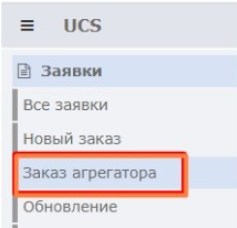
- In this request, the following fields must be filled in:
- 9-digit object code (e.g., 5000100)
- Client legal entity TIN
- Client legal entity name
- Product type Subscription License
- Payer legal entity – the Aggregator's legal entity MUST be selected
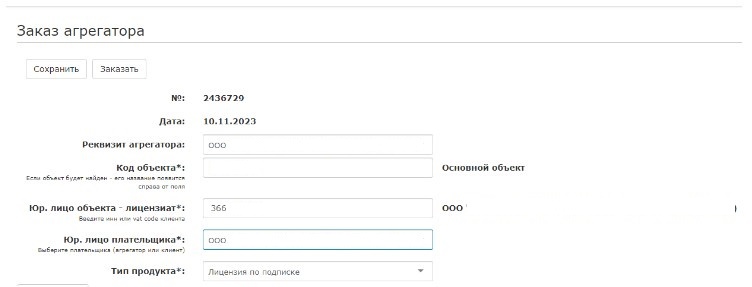
- In the tabular section of the request, select the license R-Keeper [license name] Software module and click the Order button
- The active license will automatically appear on this object. The integration can now be configured.