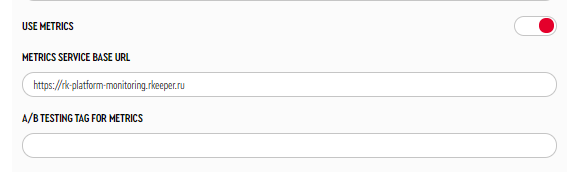
To enable the transmission of kiosk status metrics, navigate to Service Menu > Main Settings:
- Enable the parameter Use metrics.
- In the Metrics Service Base URL parameter, specify the address: https://rk-platform-monitoring.rkeeper.com.
Set the A/B Testing tag for metrics — used for additional labeling of metrics; the value can be any string, and there is no uniqueness check.
To retrieve data from the metrics service, you will need a Token. You can obtain the token by sending a request to the email: yaro@ucsrkeeper.at.
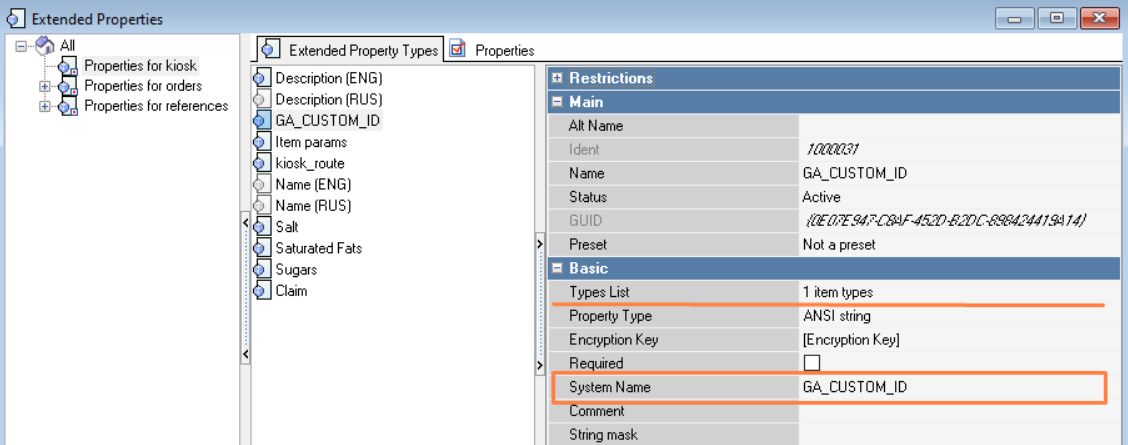
Also create a separate extended properties for the restaurant:
- System Name — GA_CUSTOM_ID
- Types List — Restaurant.
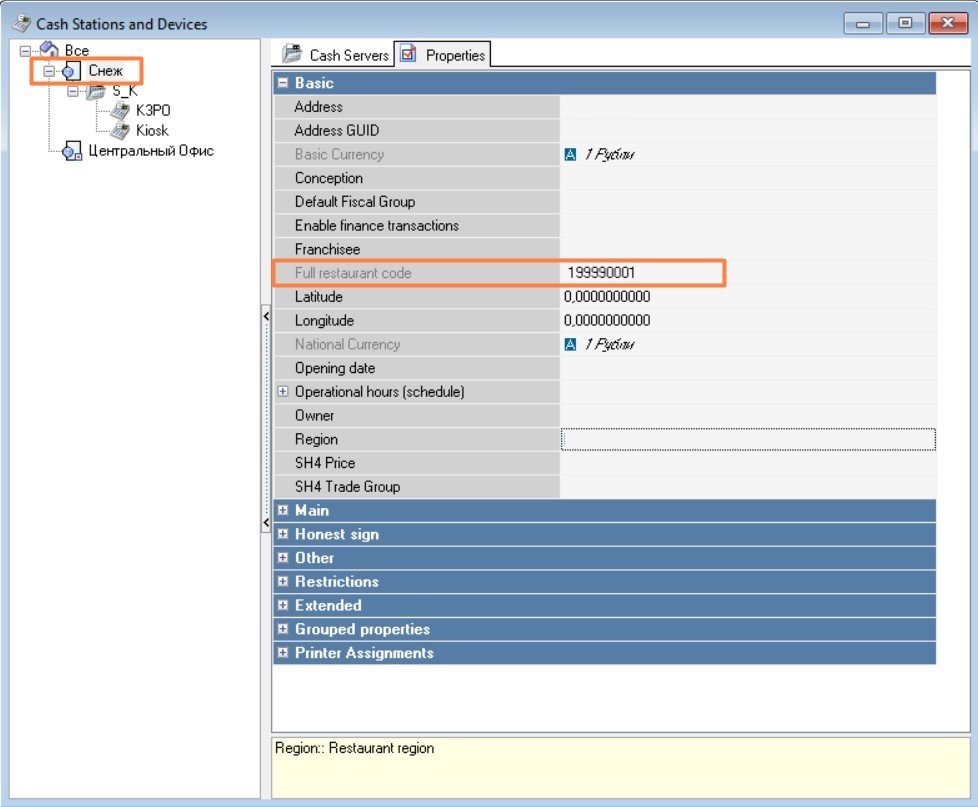
In the Service > Stations and Devices directory for the restaurant, in the created extended property, specify ChampsID — the restaurant code in the global KFC system (data can be obtained from the Franchisee).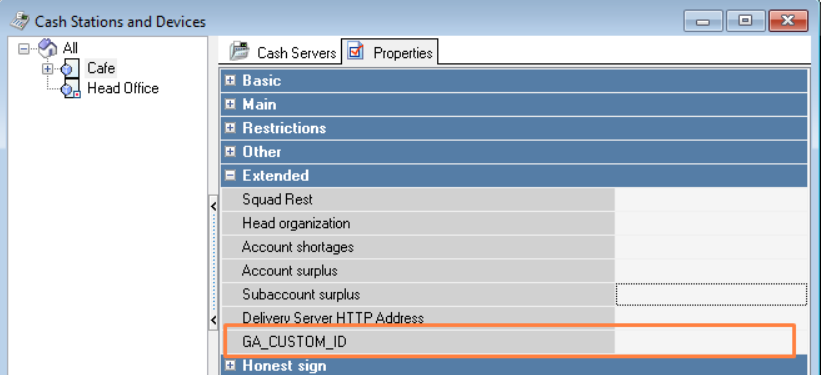
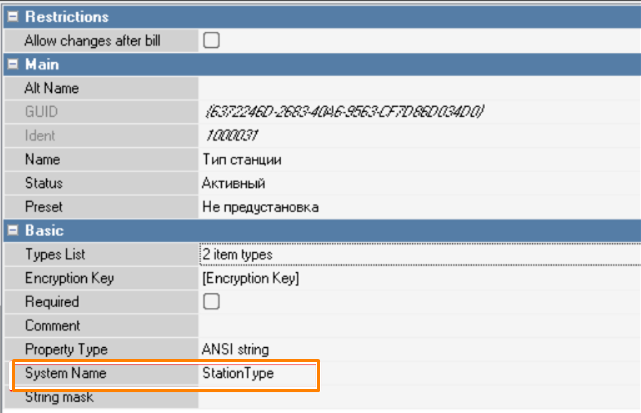
And create (if not already created) a separate extended property for the cash station:
- System Name — StationType
- Types List — Cash Station
In the created extended property on the kiosk's cash station, set the value to 3. Stations with this value will be included in the station list in references.
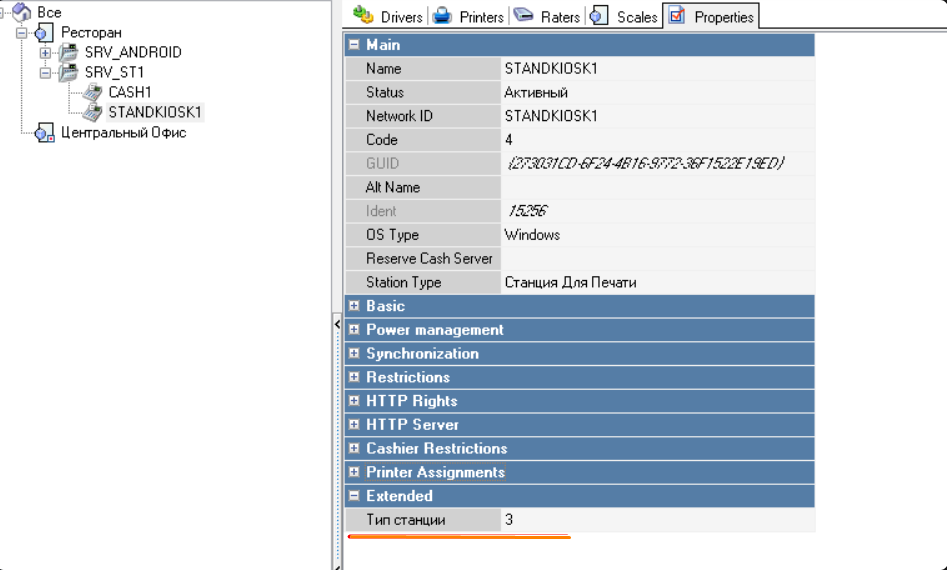
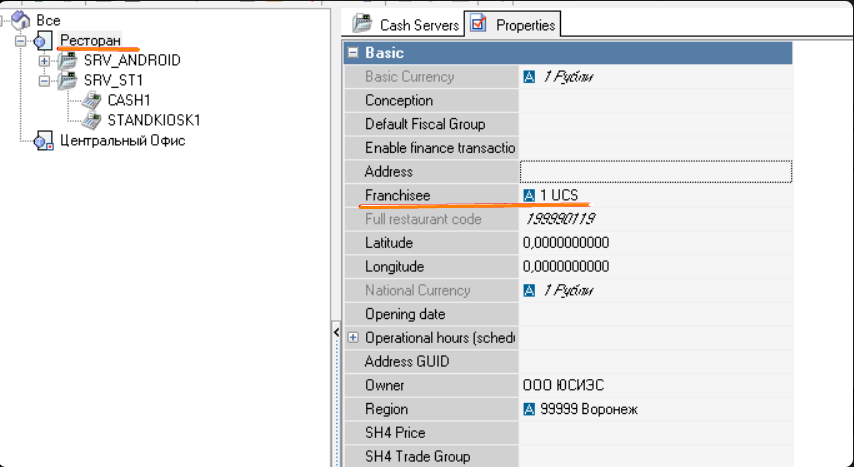
Next, in the r_keeper manager station, in the restaurant properties, in the Basic section, fill in the Franchisee parameter. This data will also be transmitted in the station list in references.
Metric types (typeData):
- References — we send a list of active cash registers (active stations with the extended property StationType = 3) and the restaurant schedule associated with the kiosk, country and franchise are sent.
- Time based event — we send the name of the current kiosk screen once every 60 seconds.
- Event based event — we send information about order payment or about sending the order for payment at the cashier.
Common fields for all metric types:
- keyId — active license key (key code in the Licensing System)
- champsID — restaurant code in the global KFC system. Any text can be entered here. Uniqueness is not checked. Заполняется в менеджерской r_keeper в расширенном свойстве
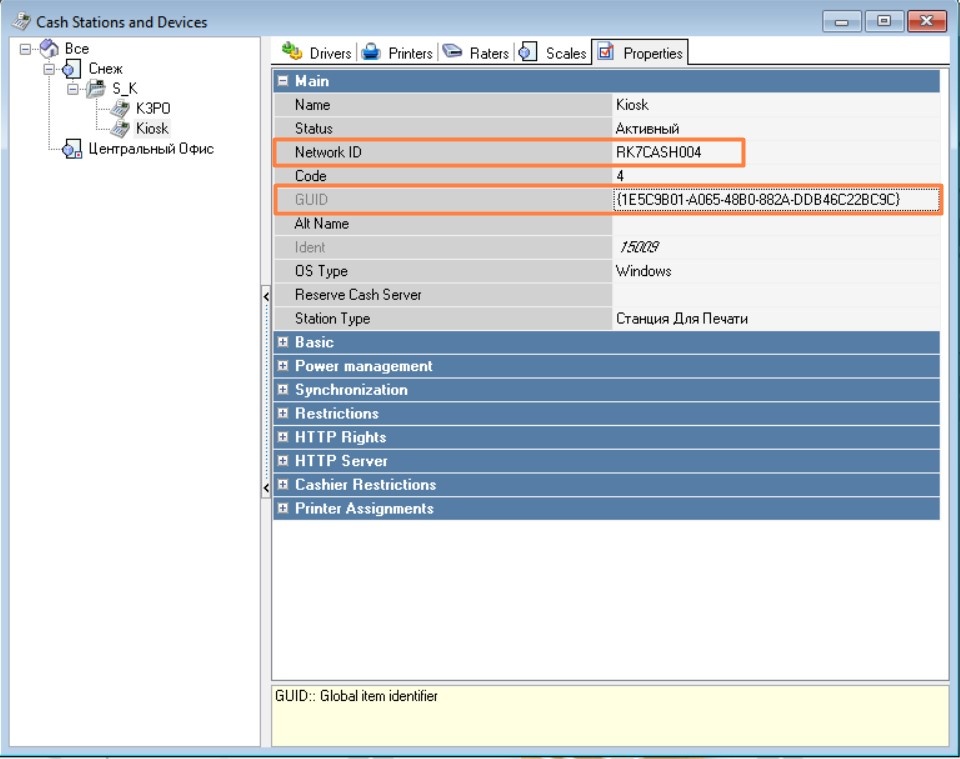
- kioskName - cashGuid — the GUID of the cash register the kiosk is connected to. In the Rkeeper Manager this field is GUID
- kioskName - cashNetName — the network name of the cash register the kiosk is connected to. In the Rkeeper Manager this field is Network ID
kioskAppVersion - back — full information about version of kiosk's backend.
Value from example: v0.0.383.21-rev.7b44ad92-j.42173:
- v0.0.383.21 — main information about kiosk's backend part;
- rev.7b44ad92-j.42173 — technical information.
- kioskAppVersion - front — front part version name
- kioskAppVersion - altFront — alternative frontend version
- kioskAppVersion - theme — used theme
- objectCode — full object code, kiosk is connected to
- tagAB - A/B Testing tag. Used for additional labeling. Set during the initial kiosk configuration in the parameter A/B Testing tag for metrics. The value can be any string, and uniqueness is not checked.
Fields depending on the metric type (data):
Metric type: References
The kiosk sends a list of active cash registers and the restaurant schedule associated with the kiosk.
Only active stations with the extended property StationType = 3 are sent
Frequency of sending References metrics:
Sent once a week or if changes are detected in the metric at kiosk startup compared to the last sent one.
Current example for the References metric type:
 {
	"typeData": "References",
	"data": {
		"restaurantName": "3252 KFC Каскад",
		"restaurantGuid": "{5EB1B98D-5CDD-4733-9836-BFC9CC6F2B45}",
		"franchise": "AMREST",
		"country": "Belarus",
		"champsID": "375123456789",
		"restaurantSchedule": [
			{
				"daysOfWeek": "[dwSunday]",
				"startTime": 36000000,
				"endTime": 72000000
			},
			{
				"daysOfWeek": "[dwMonday]",
				"startTime": 36000000,
				"endTime": 72000000
			},
			{
				"daysOfWeek": "[dwTuesday]",
				"startTime": 36000000,
				"endTime": 72000000
			},
			{
				"daysOfWeek": "[dwWednesday]",
				"startTime": 39600000,
				"endTime": 75600000
			},
			{
				"daysOfWeek": "[dwThursday]",
				"startTime": 32400000,
				"endTime": 54000000
			},
			{
				"daysOfWeek": "[dwFriday]",
				"startTime": 36000000,
				"endTime": 72000000
			},
			{
				"daysOfWeek": "[dwSaturday]",
				"startTime": 60000,
				"endTime": 86340000
			}
		],
		"cashes": [
			{
				"cashGuid": "{7F2B98A5-B365-41EB-A5EC-265E52F05AF1}",
				"cashNetName": "3252_KIOSK_PRN_1"
			},
			{
				"cashGuid": "{A0E029D9-D6D3-414E-9B30-19329677F940}",
				"cashNetName": "3252_KIOSK_PRN_2"
			}
		],
		"kioskName": {
			"cashGuid": "{A0E029D9-D6D3-414E-9B30-19329677F940}",
			"cashNetName": "3252_KIOSK_PRN_2"
		},
		"kioskAppVersion": {
			"back": "0.0.450.24",
			"front": "0.0.423.24",
			"theme": "DefaultUCS"
		},
		"objectCode": "199990207",
		"tagAB": "",
		"keyId": "AE066500"
	},
	"cnt": 4
}
- franchise — restaurant property > Basic > Franchisee in the r_k 7 manager station
- country — country (based on the 3-character prefix in champsID)
- Austria — 43K
- Belarus — 375
- Bosnia — 387
- Moldova — 373
- Slovakia — 421
- Ukraine — 380
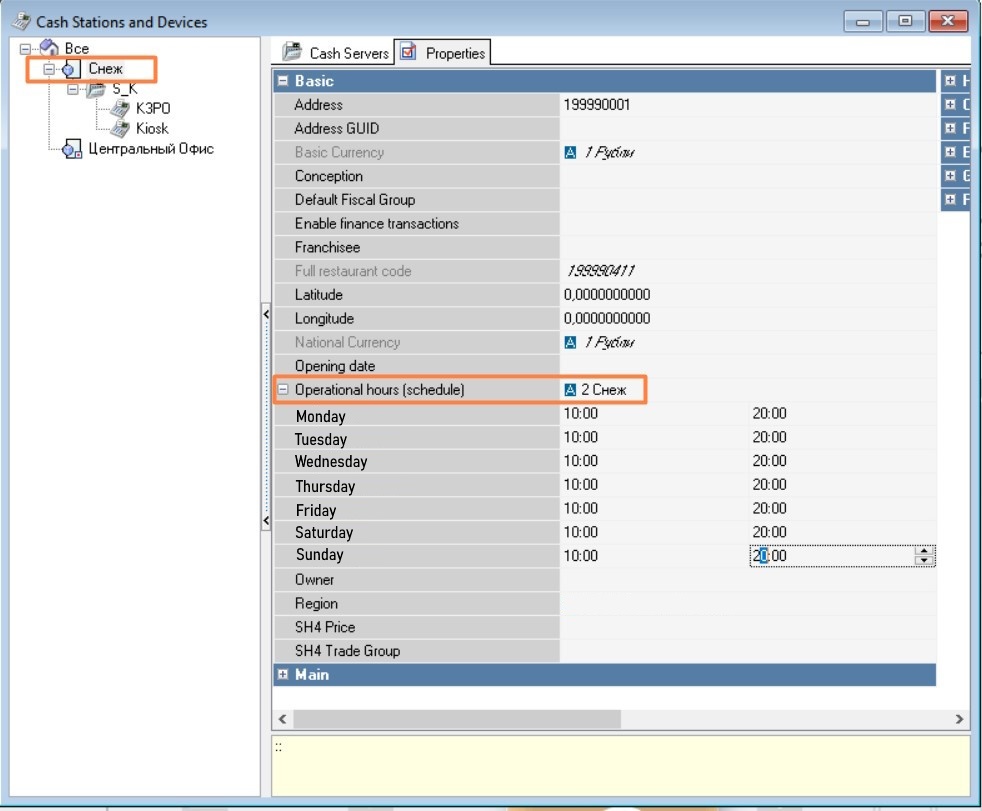
- restaurantSchedule —restaurant working schedule::
- daysOfWeek — day of the week
- startTime — start time (time in milliseconds from the beginning of the day (00:00))
- endTime — end time (time in milliseconds from the beginning of the day (00:00))
cashes — list of active cash registers of the restaurant the kiosk is connected to:
- cashGuid — cash register GUID (in the Rkeeper Manager the GUID field);
- cashNetName — network name of the cash register (in the Rkeeper Manager the Network ID field);
Metric type: Time based event
The kiosk sends the name of the current kiosk screen once every 60 seconds.
{
 	"typeData": "Time based event",
 	"data": {
 		"state": "Order",
 		"champsID": "375123456789",
 		"kioskName": {
 			"cashGuid": "{A0E029D9-D6D3-414E-9B30-19329677F940}",
  			"cashNetName": "3252_KIOSK_PRN_2"
 		},
 		"kioskAppVersion":{
  			"back": "0.0.450.24",
 			"front": "0.0.423.24",
 			"theme": "DefaultUCS"
 		},
 		"objectCode": "199990207",
 		"tagAB": "",
 		"keyId": "AE066500"
 	},
 	"cnt": 6
}
{
	"typeData": "Time based event",
	"data": {
		"state": "Waiting window",
		"champsID": "375123456789",
		"kioskName": {
			"cashGuid": "{A0E029D9-D6D3-414E-9B30-19329677F940}",
			"cashNetName": "3252_KIOSK_PRN_2"
		},
		"kioskAppVersion": {
			"back": "0.0.450.24",
			"front": "0.0.423.24",
			"theme": "DefaultUCS"
		},
		"objectCode": "199990207",
		"tagAB": "",
		"keyId": "AE066500"
	},
	"cnt": 10
}
Options for the state field (describes the current screen on the kiosk):
- Waiting window — initial welcome screen: the kiosk is operational but not in use at the moment the metric is sent
- Order — the order process. Starts when the user enters the menu on the kiosk
- Manager functions — staff is performing tasks in the kiosk’s manager interface
- Locked — the kiosk is locked
- Error — an error is displayed on the kiosk screen (for example, if something goes wrong during payment). The message is shown, but the kiosk remains operational
- Unknown — another screen
Additionally, the kiosk sends:
error – error information (during payment or when sending the order for payment at the cash station):
code – error code. If there is no error, the value is 0.
msg – error message. If there is no error, the value is unknown.
The error block is added only if there is an error.
If the error is unknown, the code is KIOSK_INTERNAL_ERROR and the message is empty.
{
	"typeData": "Time based event",
	"data": {
		"state": "Error",
		"error": {
			"code": "RK7_5304",
			"msg": "Инстанс лицензии не найден."
		},
		"champsID": "375123456789",
		"kioskName": {
			"cashGuid": "{A0E029D9-D6D3-414E-9B30-19329677F940}",
			"cashNetName": "3252_KIOSK_PRN_2"
		},
		"kioskAppVersion": {
			"back": "0.0.450.24",
			"front": "0.0.423.24",
			"theme": "DefaultUCS"
		},
		"objectCode": "199990207",
		"tagAB": "",
		"keyId": "AE066500"
	},
	"cnt": 45
}
Metric type: Event based event
The kiosk sends information about order payment or about sending the order for payment at the cashier.
{
    "typeData": "Event based event",
    "data": {
        "orderResult": "successfully",
        "orderGuid": "{19D3BCD9-5706-4D4F-BEFF-336EF741A04A}",
        "champsID": "375123456789",
        "kioskName": {
            "cashGuid": "{A0E029D9-D6D3-414E-9B30-19329677F940}",
            "cashNetName": "3252_KIOSK_PRN_2"
        },
        "kioskAppVersion": {
            "back": "0.0.450.24",
            "front": "0.0.423.24",
            "theme": "DefaultUCS"
        },
        "objectCode": "199990207",
        "tagAB": "",
        "keyId": "AE066500"
    },
    "cnt": 5
}
orderResult — result of an order.
Possible values:
- Successfully — the order was successfully paid
- Failed — an error occurred during payment
- Error_sending — an error occurred while sending the order for payment at the cashier
- Sended — the order was successfully sent to the cashier for payment
- orderGuid — the order GUID. Filled only if the payment is made at the kiosk
error — error information (during payment or sending the order for payment at the cashier):
- code — error code. If there is no error, the value is 0
- msg — error message. If there is no error, the value is unknown.
The error block is added only if there is an error.
If the error is unknown, the code KIOSK_INTERNAL_ERROR is added and the message is empty.
Error examples
"error": {
                    "code": "RK7_3813",
                    "msg": "Интерфейс СБП: Ошибка \"Операция отменена\"(18)."
                }
"error": {
                    "code": "RK7_236",
                    "msg": "Ошибка отправки данных на SBP_FARCARDS2."
                }
"error": {
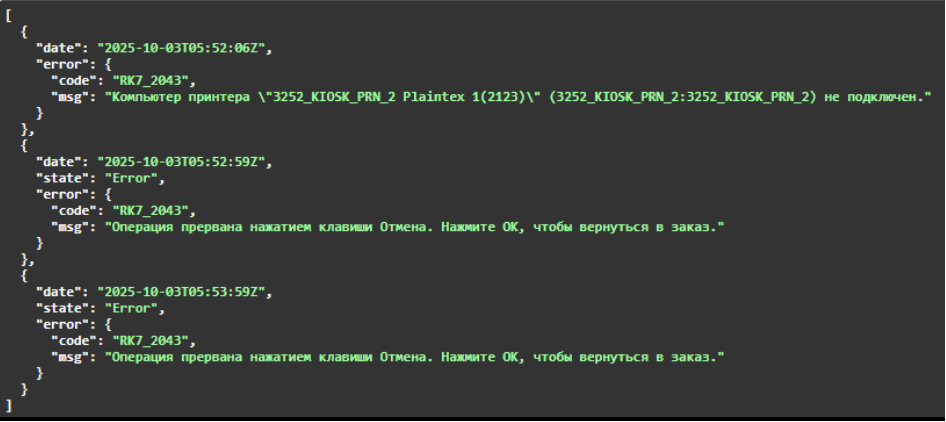
                    "code": "RK7_2043",
                    "msg": "Компьютер принтера \"3252_KIOSK_PRN_2 Plaintex 1(2123)\" (3252_KIOSK_PRN_2:3252_KIOSK_PRN_2) не подключен."
                }
                "error": {
                    "code": "RK7_2703",
                    "msg": "Некорректный код карты ПДС \"{B4034D6A-C0D0-4DFB-B768-689D7D20DD15}\"."
                }
                "error": {
                    "code": "RK7_3813",
                    "msg": "Интерфейс СБП: Ошибка \"Неверные параметры.\"(18)."
                }
Errors on the kiosk can be either external (from r_keeper 7) or internal (from kiosk).
Internal erorr codes:
External error codes returned by rk7 (marked with the RK7_ prefix followed by the specific error code) are listed in the article Erorr codes.
Methods for retrieving specific information from metrics
Method
GET /api/v1/metrics/read
This method allows you to retrieve all metric types for a specific period, for a specific object code, and for a specific kiosk.
Filters:
- dateFrom and dateTo — the time range for the metrics (from/to).
- cntFrom and cntTo — the message counter range (field cnt).
- total — the number of metrics to return in the response.
- cashNetName — the kiosk name.
- champsID — the kiosk's champsID.
- objectCode — the kiosk object code.
Request:
curl --location --request POST 'https://rk-platform-monitoring.rkeeper.com/api/v1/metrics/read' \
--header 'Authorization: Bearer <Token> \ The Token can be obtained by requesting at yaro@ucsrkeeper.at.
--header 'Content-Type: application/json' \
--data-raw '{
    "dateFrom": "2025-05-06T00:00:00Z",
    "dateTo": "2025-05-07T23:00:00Z",
    "cntFrom": 12000,
    "cntTo": 13000,
    "total": 100,
    "cashNetName": "KIOSK_1_STM",
    "champsID": "387K04",
    "objectCode": "527280004"
}'
[
     {
        "timestamp": "2025-07-08T14:57:51Z",
        "payload": {
            "typeData": "Time based event",
            "data": {
                "state": "Waiting window",
                "champsID": "234234234234211",
                "kioskName": {
                    "cashGuid": "{1E5C9B01-A065-48B0-882A-DDB46C22BC9C}",
                    "cashNetName": "RK7CASH004"
                },
                "kioskAppVersion": {
                    "back": " v0.0.383.21-rev.7b44ad92-j.42173",
                    "front": "0.0.330.21",
                    "theme": "KFCCee"
                },
                "objectCode": "199990001",
                "tagAB": "AAA"
            },
            "cnt": 21259
        }
    }
]
- timestamp —the date and time the metric was saved on server
payload - typeData — metric type
payload - data — main information about the metric (depends on the type of metric)
payload - cnt — metric counter. Starts at 1 for each kiosk and increments by 1 as metrics are sent from the kiosk.
To retrieve data from the metrics service, you will need a Token. You can obtain the token by sending a request to the email: yaro@ucsrkeeper.at.
Also create a separate extended properties for the restaurant:
- System Name — GA_CUSTOM_ID
- Types List — Restaurant.

In the Service > Cash Stations and Devices directory for the restaurant, in the created extended property, specify ChampsID — the restaurant code in the global KFC system (data can be obtained from the Franchisee).
And create (if not already created) a separate extended property for the cash station:
- System Name — StationType
- Types List — Cash Station
In the created extended property on the kiosk's cash station, set the value to 3. Stations with this value will be included in the station list in references.


Next, in the r_keeper manager station, in the restaurant properties, in the Basic section, fill in the Franchisee parameter. This data will also be transmitted in the station list in references.

Metric types (typeData):
- References — we send a list of active cash registers (active stations with the extended property StationType = 3) and the restaurant schedule associated with the kiosk, country and franchise are sent.
- Time based event — we send the name of the current kiosk screen once every 60 seconds.
- Event based event — we send information about order payment or about sending the order for payment at the cashier.
Common fields for all metric types:
- keyId — active license key (key code in the Licensing System)
- champsID — restaurant code in the global KFC system. Any text can be entered here. Uniqueness is not checked. Filled in the r_keeper manager station as an extended property.
- kioskName - cashGuid — the GUID of the cash register the kiosk is connected to. In the Rkeeper Manager this field is GUID
- kioskName - cashNetName — the network name of the cash register the kiosk is connected to. In the Rkeeper Manager this field is Network ID

kioskAppVersion - back — full information about version of kiosk's backend.
Value from example: v0.0.383.21-rev.7b44ad92-j.42173:
- v0.0.383.21 — main information about kiosk's backend part;
- rev.7b44ad92-j.42173 — technical information.
- kioskAppVersion - front — front part version name
- kioskAppVersion - altFront — alternative frontend version
- kioskAppVersion - theme — used theme
- objectCode — full object code, kiosk is connected to

- tagAB - A/B Testing tag. Used for additional labeling. Set during the initial kiosk configuration in the parameter A/B Testing tag for metrics. The value can be any string, and uniqueness is not checked.
Fields depending on the metric type (data):
Metric type: References
The kiosk sends a list of active cash registers and the restaurant schedule associated with the kiosk.
Only active stations with the extended property StationType = 3 are sent
Frequency of sending References metrics:
Sent once a week or if changes are detected in the metric at kiosk startup compared to the last sent one.
Current example for the References metric type:
 {
	"typeData": "References",
	"data": {
		"restaurantName": "3252 KFC Kaskad",
		"restaurantGuid": "{5EB1B98D-5CDD-4733-9836-BFC9CC6F2B45}",
		"franchise": "AMREST",
		"country": "Belarus",
		"champsID": "375123456789",
		"restaurantSchedule": [
			{
				"daysOfWeek": "[dwSunday]",
				"startTime": 36000000,
				"endTime": 72000000
			},
			{
				"daysOfWeek": "[dwMonday]",
				"startTime": 36000000,
				"endTime": 72000000
			},
			{
				"daysOfWeek": "[dwTuesday]",
				"startTime": 36000000,
				"endTime": 72000000
			},
			{
				"daysOfWeek": "[dwWednesday]",
				"startTime": 39600000,
				"endTime": 75600000
			},
			{
				"daysOfWeek": "[dwThursday]",
				"startTime": 32400000,
				"endTime": 54000000
			},
			{
				"daysOfWeek": "[dwFriday]",
				"startTime": 36000000,
				"endTime": 72000000
			},
			{
				"daysOfWeek": "[dwSaturday]",
				"startTime": 60000,
				"endTime": 86340000
			}
		],
		"cashes": [
			{
				"cashGuid": "{7F2B98A5-B365-41EB-A5EC-265E52F05AF1}",
				"cashNetName": "3252_KIOSK_PRN_1"
			},
			{
				"cashGuid": "{A0E029D9-D6D3-414E-9B30-19329677F940}",
				"cashNetName": "3252_KIOSK_PRN_2"
			}
		],
		"kioskName": {
			"cashGuid": "{A0E029D9-D6D3-414E-9B30-19329677F940}",
			"cashNetName": "3252_KIOSK_PRN_2"
		},
		"kioskAppVersion": {
			"back": "0.0.450.24",
			"front": "0.0.423.24",
			"theme": "DefaultUCS"
		},
		"objectCode": "199990207",
		"tagAB": "",
		"keyId": "AE066500"
	},
	"cnt": 4
}
- franchise — restaurant property > Basic > Franchisee in the r_k7 manager station
- country — country (based on the 3-character prefix in champsID)
- Austria — 43K
- Belarus — 375
- Bosnia — 387
- Moldova — 373
- Slovakia — 421
- Ukraine — 380
- Austria — 43K
- restaurantSchedule —restaurant working schedule::
- daysOfWeek — day of the week
- startTime — start time (time in milliseconds from the beginning of the day (00:00))
- endTime — end time (time in milliseconds from the beginning of the day (00:00))

cashes — list of active cash registers of the restaurant the kiosk is connected to:
- cashGuid — cash register GUID (in the Rkeeper Manager the GUID field);
- cashNetName — network name of the cash register (in the Rkeeper Manager the Network ID field);
Metric type: Time based event
The kiosk sends the name of the current kiosk screen once every 60 seconds.
{
 	"typeData": "Time based event",
 	"data": {
 		"state": "Order",
 		"champsID": "375123456789",
 		"kioskName": {
 			"cashGuid": "{A0E029D9-D6D3-414E-9B30-19329677F940}",
  			"cashNetName": "3252_KIOSK_PRN_2"
 		},
 		"kioskAppVersion":{
  			"back": "0.0.450.24",
 			"front": "0.0.423.24",
 			"theme": "DefaultUCS"
 		},
 		"objectCode": "199990207",
 		"tagAB": "",
 		"keyId": "AE066500"
 	},
 	"cnt": 6
}
{
	"typeData": "Time based event",
	"data": {
		"state": "Waiting window",
		"champsID": "375123456789",
		"kioskName": {
			"cashGuid": "{A0E029D9-D6D3-414E-9B30-19329677F940}",
			"cashNetName": "3252_KIOSK_PRN_2"
		},
		"kioskAppVersion": {
			"back": "0.0.450.24",
			"front": "0.0.423.24",
			"theme": "DefaultUCS"
		},
		"objectCode": "199990207",
		"tagAB": "",
		"keyId": "AE066500"
	},
	"cnt": 10
}
Options for the state field (describes the current screen on the kiosk):
- Waiting window — initial welcome screen: the kiosk is operational but not in use at the moment the metric is sent
- Order — the order process. Starts when the user enters the menu on the kiosk
- Manager functions — staff is performing tasks in the kiosk’s manager interface
- Locked — the kiosk is locked
- Error — an error is displayed on the kiosk screen (for example, if something goes wrong during payment). The message is shown, but the kiosk remains operational
- Unknown — another screen
Additionally, the kiosk sends:
error – error information (during payment or when sending the order for payment at the cash station):
code – error code. If there is no error, the value is 0.
msg – error message. If there is no error, the value is unknown.
The error block is added only if there is an error.
If the error is unknown, the code is KIOSK_INTERNAL_ERROR and the message is empty.
{
	"typeData": "Time based event",
	"data": {
		"state": "Error",
		"error": {
			"code": "RK7_5304",
			"msg": "License instance not found."
		},
		"champsID": "375123456789",
		"kioskName": {
			"cashGuid": "{A0E029D9-D6D3-414E-9B30-19329677F940}",
			"cashNetName": "3252_KIOSK_PRN_2"
		},
		"kioskAppVersion": {
			"back": "0.0.450.24",
			"front": "0.0.423.24",
			"theme": "DefaultUCS"
		},
		"objectCode": "199990207",
		"tagAB": "",
		"keyId": "AE066500"
	},
	"cnt": 45
}
Metric type: Event based event
The kiosk sends information about order payment or about sending the order for payment at the cashier.
{
    "typeData": "Event based event",
    "data": {
        "orderResult": "successfully",
        "orderGuid": "{19D3BCD9-5706-4D4F-BEFF-336EF741A04A}",
        "champsID": "375123456789",
        "kioskName": {
            "cashGuid": "{A0E029D9-D6D3-414E-9B30-19329677F940}",
            "cashNetName": "3252_KIOSK_PRN_2"
        },
        "kioskAppVersion": {
            "back": "0.0.450.24",
            "front": "0.0.423.24",
            "theme": "DefaultUCS"
        },
        "objectCode": "199990207",
        "tagAB": "",
        "keyId": "AE066500"
    },
    "cnt": 5
}
orderResult — result of an order.
Possible values:
- Successfully — the order was successfully paid
- Failed — an error occurred during payment
- Error_sending — an error occurred while sending the order for payment at the cashier
- Sended — the order was successfully sent to the cashier for payment
- orderGuid — the order GUID. Filled only if the payment is made at the kiosk
error — error information (during payment or sending the order for payment at the cashier):
- code — error code. If there is no error, the value is 0
- msg — error message. If there is no error, the value is unknown.
The error block is added only if there is an error.
If the error is unknown, the code KIOSK_INTERNAL_ERROR is added and the message is empty.
Error examples
"error": {
                    "code": "RK7_3813",
                    "msg": "FPS interface: Error \"Operation canceled\"(18)."
                }
"error": {
                    "code": "RK7_236",
                    "msg": "Error sending data to FPS_FARCARDS2.."
                }
"error": {
                    "code": "RK7_2043",
                    "msg": "Printer computer \"3252_KIOSK_PRN_2 Plaintex 1(2123)\" (3252_KIOSK_PRN_2:3252_KIOSK_PRN_2) is not connected."
                }
                "error": {
                    "code": "RK7_2703",
                    "msg": "Invalid PDS card code \"{B4034D6A-C0D0-4DFB-B768-689D7D20DD15}\"."
                }
                "error": {
                    "code": "RK7_3813",
                    "msg": "FPS interface: Error \"Invalid parameters.\"(18)."
                }
Errors on the kiosk can be either external (from r_keeper 7) or internal (from kiosk).
Internal erorr codes:
External error codes returned by rk7 (marked with the RK7_ prefix followed by the specific error code) are listed in the article Erorr codes.
Methods for retrieving specific information from metrics
Method
GET /api/v1/metrics/read
This method allows you to retrieve all metric types for a specific period, for a specific object code, and for a specific kiosk.
Filters:
- dateFrom and dateTo — the time range for the metrics (from/to).
- cntFrom and cntTo — the message counter range (field cnt).
- total — the number of metrics to return in the response.
- cashNetName — the kiosk name.
- champsID — the kiosk's champsID.
- objectCode — the kiosk object code.
Request:
curl --location --request POST 'https://rk-platform-monitoring.rkeeper.com/api/v1/metrics/read' \
--header 'Authorization: Bearer <Token> \ The Token can be obtained by requesting at yaro@ucsrkeeper.at.
--header 'Content-Type: application/json' \
--data-raw '{
    "dateFrom": "2025-05-06T00:00:00Z",
    "dateTo": "2025-05-07T23:00:00Z",
    "cntFrom": 12000,
    "cntTo": 13000,
    "total": 100,
    "cashNetName": "KIOSK_1_STM",
    "champsID": "387K04",
    "objectCode": "527280004"
}'
[
     {
        "timestamp": "2025-07-08T14:57:51Z",
        "payload": {
            "typeData": "Time based event",
            "data": {
                "state": "Waiting window",
                "champsID": "234234234234211",
                "kioskName": {
                    "cashGuid": "{1E5C9B01-A065-48B0-882A-DDB46C22BC9C}",
                    "cashNetName": "RK7CASH004"
                },
                "kioskAppVersion": {
                    "back": " v0.0.383.21-rev.7b44ad92-j.42173",
                    "front": "0.0.330.21",
                    "theme": "KFCCee"
                },
                "objectCode": "199990001",
                "tagAB": "AAA"
            },
            "cnt": 21259
        }
    }
]
- timestamp —the date and time the metric was saved on server
payload - typeData — metric type
payload - data — main information about the metric (depends on the type of metric)
payload - cnt — metric counter. Starts at 1 for each kiosk and increments by 1 as metrics are sent from the kiosk.
Method
GET /api/v1/references/{objectCode}
This method allows you to obtain, by object code from the licensing system, a list of all active keyId. Then, for each keyId, a mapping is made between the station guid and cashNetName from the state metrics.
Filters
The method supports optional filters:
startDateendDate
If filters are not specified, data is returned for the current date.
You can pass as a value:
- a date;
- a date and time.
Response example:
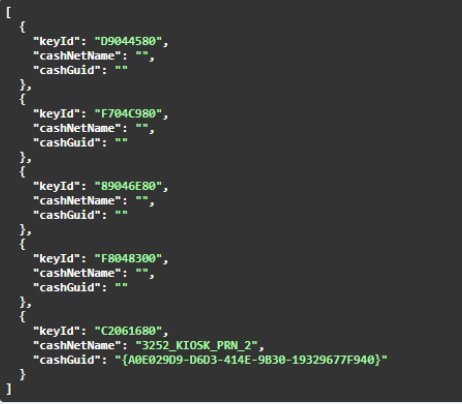
If under a certain keyId the cashNetName and cashGuid are empty, it means that station does not send metrics.
Method
GET /api/v1/country/{country}/objects
This method allows you to obtain data on object codes and the list of kiosks by country.
Filters
The method supports optional filters:
startDateendDate
If filters are not specified, data is returned for the current date.
You can pass as a value:
- a date;
- a date and time.
Response example:
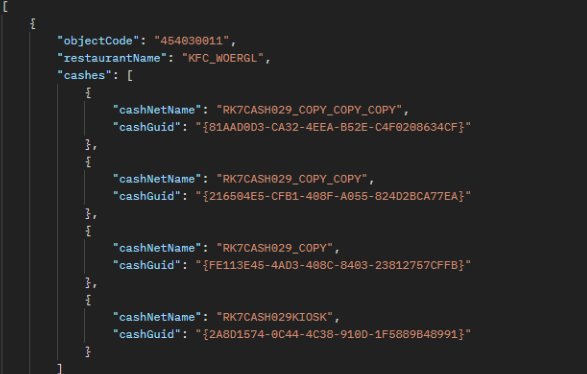
If the response is empty, it means that restaurants in that country do not have champsID filled in, since the country is determined by it.
Method
GET /api/v1/cash/{cashGuid}/errors
This method allows you to obtain error data for a specific kiosk.
Filters
The method supports optional filters:
startDateendDate
If filters are not specified, data is returned for the current date.
You can pass as a value:
- a date;
- a date and time.
Response example: