For r_keeper 7.6.5 and higher

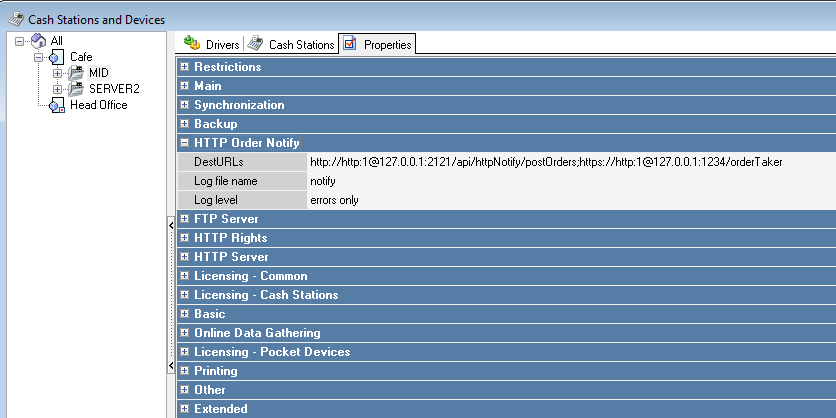
Starting from version 7.6.5.371, the Http Order Notify settings have moved from Devices to the Cash server properties. The procedure for these versions is as follows:

  1. In the driver parameter DestURLs, specify the connection string as:
    http://GS_server_address:GS_server_port/api/httpNotify/postOrders
  2. Save the changes
  3. Restart the cash server.

    If you need to specify multiple connection strings, they can be specified separated by semicolons ";".
    For example: http://127.0.0.1:2121/api/httpNotify/postOrders;http://127.0.0.1:1234/orderTaker

    If multiple connection strings are used, the cash server property HTTP Order Notify must be licensed. Read more in the article Licensing.

For r_keeper older than 7.6.5

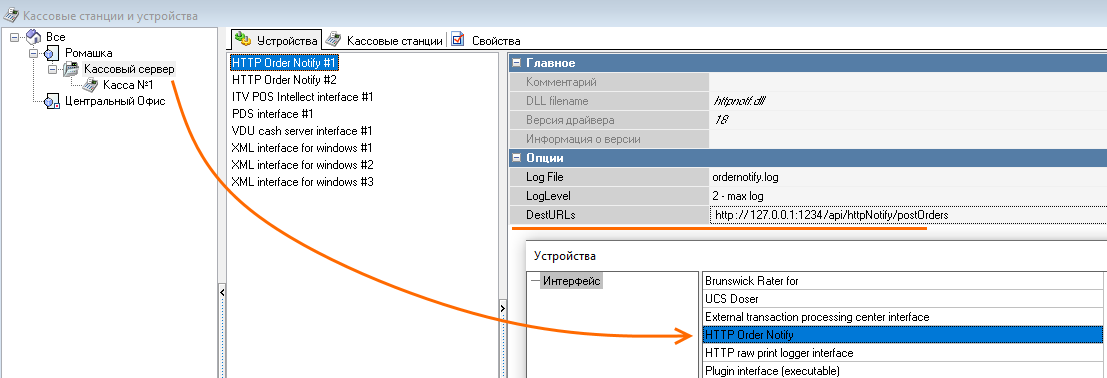
If your r_keeper version is lower than 7.6.5, you need to add the HTTP Order Notify interface to the cash server yourself. To do this:

  1. For KDS PRO to work, driver version 18 or higher is required. Therefore, if your version is lower, download the driver from FTP before adding the interface to the cash server: ftp://ftp.ucs.ru/rk7/other/KDS_PRO/Extra_Files/httpnotf.udb
  2. Copy the httpnotf.udb file, replacing it in the directory server folder
  3. Restart the cash server
  4. Add the HTTP Order Notify driver to the cash server

  5. Configure the driver for all cash servers as needed.
  6. In the driver parameter DestURLs, specify the connection string as:
    http://GS_server_address:GS_server_port/api/httpNotify/postOrders

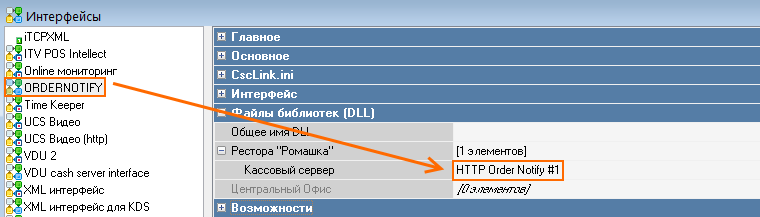
  7. Go to Service > Interfaces and create a new interface
  8. In the Library Files (DLL) section, select the desired restaurant and assign the HTTP Order Notify driver to the cash server
  9. Activate the interface and save.