To work with supplier orders, open the list of documents "Orders". Like any list of documents, "Orders" can be filtered.
Filter for the "Orders" list:
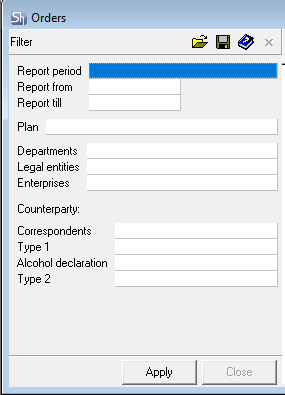
If the filter fields are left blank, all orders in the r_k StoreHouse Pro database will be displayed in the list.
If any filter field is not filled, the document selection will be performed for all values of that field.
The list of orders is filtered by the goods delivery date.
"Report From" – in this field, enter the date starting from which orders will be displayed in the list.
"Report To" – in this field, enter the date up to which inclusive orders will be displayed in the list.
The date fields can be filled manually by selecting from the calendar.
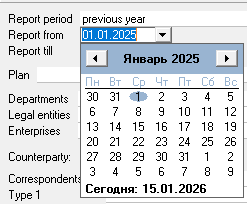
To define the period for generating the order list, you can use the predefined list of periods; for this, select a value in the "Report Period" field.
To clear a filled date field, select the corresponding field and choose the Delete context menu item or press the [Delete] button on the keyboard.
Plan – in this field, you can select the plan title for which orders need to be displayed in the list.
"Department" – in this field, you can select the departments for which orders will be displayed in the order list.
"Legal Entities" – in this field, you can select own legal entities for which orders will be displayed in the order list.
"Enterprises" – in this field, you can select enterprises for which orders will be displayed in the order list.
The filter fields "Department"; "Legal Entities" and "Enterprises" are linked. When filling one field (e.g., "legal entity"), the available list for selection in the filter for other fields (e.g., "departments") is reduced.
Correspondent– in this group of fields, you can define the list of correspondents for whom orders have been formed. Selection of correspondents can be done by additional fields "Type 1", "Alc. Declaration", "Type 2".
After filling out the filter, click the [Apply] button to generate the report. The filter closes automatically. The window will display a list of orders.
