Procurement Plan Content
The figure shows an example of a report filtered by the goods group "Fruits" with grouping by goods groups.
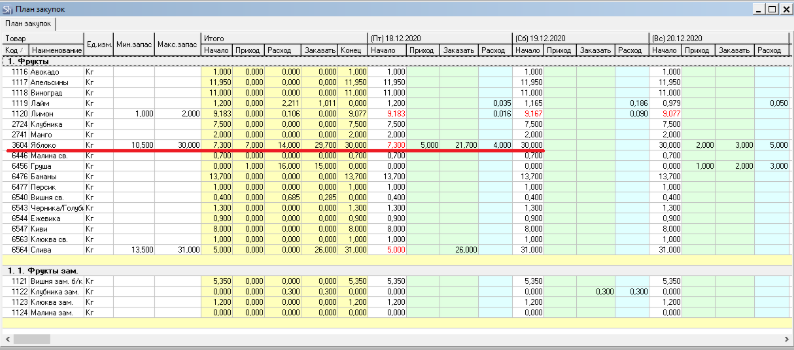
Goods (Code, Name) – code and name of the r_k StoreHouse Pro goods item for which the procurement plan is being formed.
UOM – the base unit of measurement of the goods item.
Min. margin (stock) – the total quantity of the minimum stock level across all departments of the enterprise specified in the plan title selected in the filter.
Max. margin (stock) – the <u>[total quantity]</u> of the maximum stock level across all departments of the enterprise specified in the plan title selected in the filter.
The minimum and maximum stock levels are set for the base unit of measurement on the goods card.
If min. margin (stock) or max. margin (stock) are not specified on the goods card, this value is considered "undefined". During procurement planning, the quantity to order will be determined "to zero after expenditure" regardless of the rules set in the plan title.
Date (day of week) – date and day of the week for planning the order based on the production plan and the rules of the selected plan title.
Start – the theoretical balance of the goods across all departments of the enterprise "at the morning" of the specified date.
Receipt – the quantity of the goods in already created supplier orders for this date for the enterprise from the plan title. Only orders in statuses with the "In Plan" flag are processed.
Expenditure – the theoretical expenditure of the goods on this date, formed based on the saved "Production Plan".
To Order – the calculated value of the quantity to order, taking into account the rule set in the plan title (balance at the start of the next day = min. margin (stock) or max. margin (stock) or 0).
To Order = Bal. at start of next date (min margin (stock), or max margin (stock) or 0 from rule for plans) MINUS Balance at start of current day MINUS Theor. receipt from orders PLUS Theor. expenditure from production plan.
Total (Start) – the goods balance at the start of the first date of the planned period.
Total (Receipt) – the total theoretical receipt from all orders for the dates of the planned period. Orders only for the enterprise from the plan title and with statuses with the "In Plan" flag.
Total (Expenditure) – the total theoretical expenditure for all days from the production plan.
Total (To Order) – the total quantity of goods to order for all dates of the procurement plan.
Total (End) – the goods balance at the end of the last date of the planned period.
Based on the "Procurement Plan" report, you can form orders to suppliers. To do this, filter the report by the required goods groups or categories. In the report, use the context menu item "Create Order for Date".
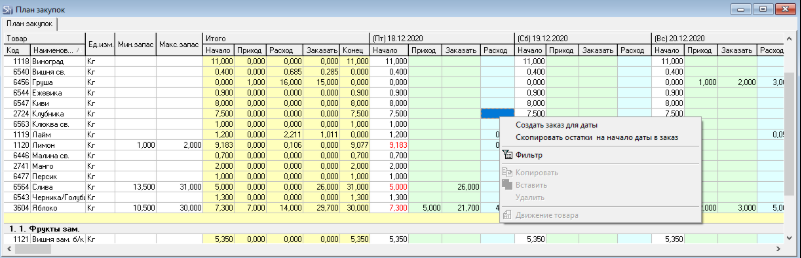
Depending on the planning parameters, the order quantity is calculated up to the minimum or up to the maximum stock level.
If any value for a specific date changes, the planned quantities (values "balances" and "to order") for subsequent dates will be automatically recalculated.

At the time of this user manual release, the "Procurement Plan" cannot be locked against adjustments.
If the planned balance goes beyond the minimum or maximum margin (stock), it will be highlighted in red. This means actions need to be taken to review the formed orders (i.e., the "Receipt" values).