To obtain a list of goods for forming orders, you need to fill out the report filter.
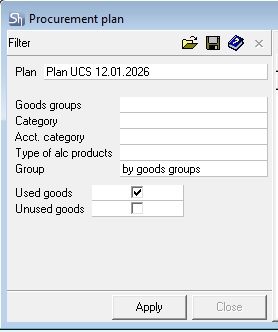
Plan – select the plan title based on which the calculation of goods and their quantities for procurement will be performed. Based on this plan title, the enterprise and the rule for calculating the order quantity for goods will be determined.
If orders are planned to be created for a specific group of goods or category of goods, the list of goods displayed in the report can be filtered by these parameters. The filter parameters "Goods Groups", "Category", "Accounting Category", "Type of Alc. Product" are filled in using standard methods. If you need to display the entire list of goods, leave the goods filter parameters blank.
The list of goods can also be displayed with grouping applied. Possible values: do not group, by goods groups, by categories, by accounting categories, by types of alc. products.
Used Goods – this flag is set if the procurement plan needs to display only goods from the production plan (the "Expenditure" or "Receipt" column is filled).
Unused Goods – this flag is set if the procurement plan needs to display only goods that are NOT involved in the production plan ("Expenditure"/"Receipt" are empty).
When both flags are set, all r_k StoreHouse Pro goods will appear in the report.
After filling out the filter, click the [Apply] button.