Table of the "Reconciliation of Orders and Invoices" report:
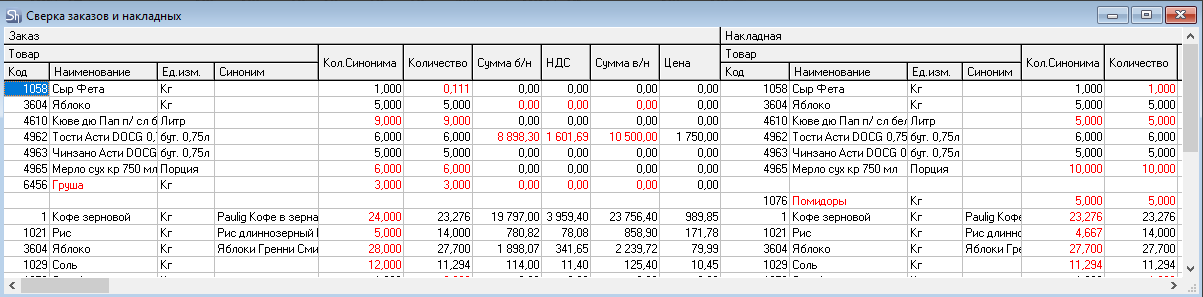
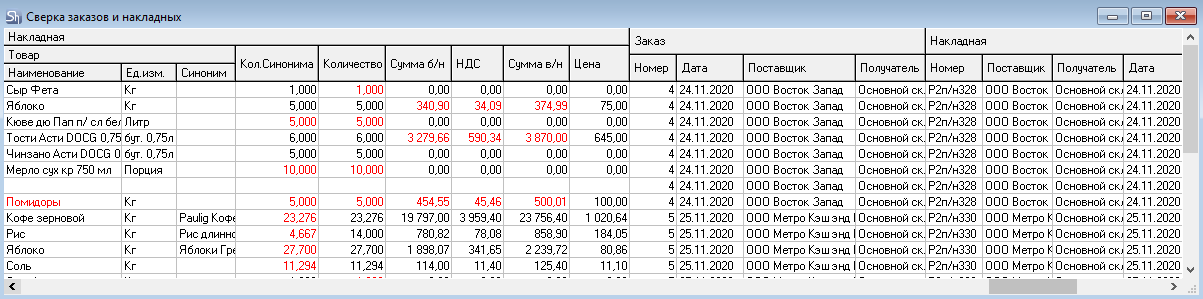
The list displays goods line by line, indicating the quantity and amounts of this goods item in the order, its quantity and amounts in the note created for this order, as well as the order number and note number that meet the specified filter.
The values in the Order-Goods group of fields are filled from the order specified in the corresponding row, and the fields in the Note-Goods group are filled from the note specified in that row.
If one of the "Goods" areas is filled and the other is not, it means this item is missing from the respective document.
Fields that differ between the order and the note are highlighted in red in the report.
The table consists of the following columns:
Order-Goods field group:
Code – contains the goods item number in the goods catalog.
Name – contains the name of the good.
UOM – contains the base unit of measure for the good.
Synonym – contains the synonym specified in the order for this good.
Number of synonyms indicates the quantity of the goods item in the synonym's units of measure. If no synonym is specified, the synonym quantity matches the goods item quantity.
Quantity indicates the quantity of the goods in base units of measure. If the goods quantity is less than the minimum stock or greater than the maximum stock, it is highlighted in red.
The values of the "Price", "Sum e/t", "VAT", "Sales Tax", and "Sum i/t" fields are taken from the order specified in the corresponding row in the right part of the report.
The "Note – Good" field group is filled similarly to the "Order-Good" fields, but the data is taken from the Goods Receipt Note document.
The Order fields display information on orders meeting the specified filter:
Number – this field displays the order number assigned upon its creation.
Date – this field indicates the delivery date of the order.
Supplier – this field displays the supplier specified in the order on the Title tab.
Recipient – this field displays the department specified in the order on the Title tab.
The Delivery Note fields display data from the note created based on the order from the corresponding row:
Number – this field displays the note number assigned upon its creation.
Date – the creation date of the delivery note.
Supplier – this field displays the supplier specified in the note on the Title tab.
Recipient – this field displays the recipient specified in the note on the Title tab.