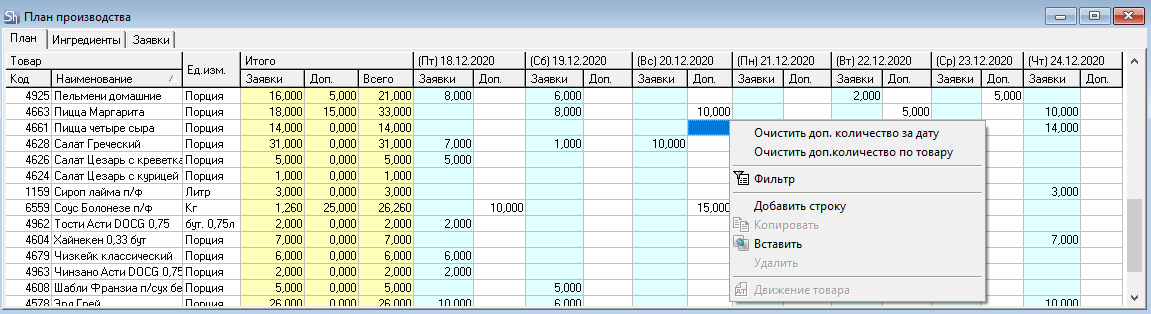
The production plan can be edited on the plan form:
Add quantity to already existing items in the list
If it is known that on some planning dates the need for dishes, semi-finished goods, ingredients will be higher than the calculated value, the quantity can be added manually. To do this:
Position the cursor in the "Add." field for the required date;
Specify the required quantity by entering the value from the keyboard;
Press [Enter];
If necessary, move to another date or another goods item and enter the required quantity in the "Add." field;
Save the entered data by clicking the [Save] button on the toolbar or using the "Save Document" item of the main "Document" menu.

Add a goods item to the list
If it is known that on some planning dates, dishes, semi-finished goods, ingredients that are not in the list from requests will be required, and the user does not have access to edit requests, such items can be added to the plan manually. To do this:
Use the context menu item "Add Row";
Go to the goods directory and select the required one from the list;
Position the cursor in the "Add." field for the required date;
Specify the required quantity by entering the value from the keyboard;
Save the entered data by clicking the [Save] button on the toolbar or using the "Save Document" item of the main "Document" menu.
Revert to Calculated Values
If during planning for a goods item it is necessary to keep only the calculated values, use the context menu items:
Clear Add. Quantity for Date – when this menu item is called for a specific plan date, the add. quantities for all goods for that date will be deleted.
Clear Add. Quantity for Goods Item – when this menu item is called for a specific plan goods item, the "Add. Quantities" for all plan dates for that goods item will be cleared.