Order Status – a property of a supplier order by which the order's state can be determined. Order statuses can be used when filtering reports, as well as when forming future orders.
The list of order statuses can be viewed and edited in the menu item "Order Statuses" of the main "Service" - "Logistics" menu.
r_k StoreHouse Pro has a predefined list of order statuses. If necessary, users can expand the list.
"In Plan" - this flag determines orders in which statuses should be accounted for in the "Procurement Plan" in the "Receipt" field.
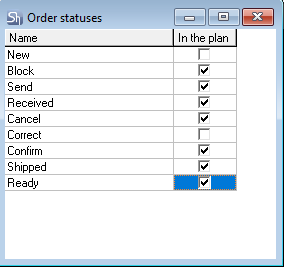
To add a new status:
Open the list of order statuses - "Service" — "Logistics" — "Order Statuses";
Press the [Insert] key or [↓]. You can also use the context menu item Add Row or the* "Add Row" item of the main "Edit" menu;
Enter the status name and set the "In Plan" property if orders in this status should be accounted for in the "Procurement Plan";
Save (main menu item "Document" — "Save Document" or the button on the toolbar).
To edit a status, select the row and make the necessary changes;
To delete a status, position the cursor on the desired row and call the main menu item "Edit" — "Delete Row"* or use the key combination [Ctrl]+[Delete];
Save the changes made to the list (main menu item "Document" — "Save Document" or the button  on the toolbar).